
iPhone & iPad
Open the link in Safari, tap Download, then find the file in Files → Downloads. Tap Share → Save Video to move it into Photos. Works on iOS 13 and later with no shortcut needed.
Read the iPhone & iPad guide →One TikTok video downloader for every kind of TikTok content. Each tool is tuned for its format.
The same steps to download TikTok videos work in Safari, Chrome, Firefox, Edge and Samsung Internet.
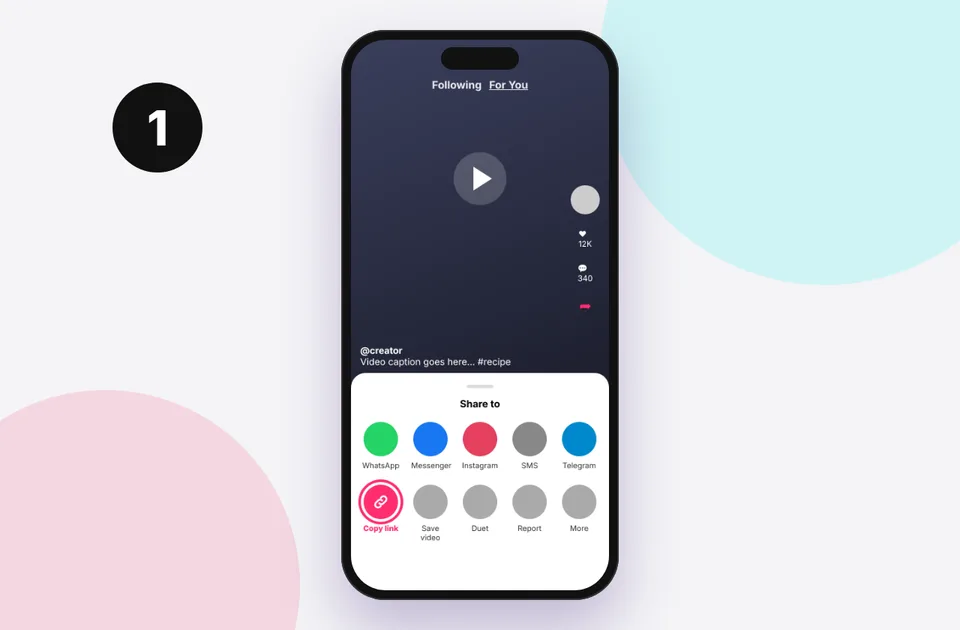
Open the video in TikTok, tap Share (the arrow icon) and choose Copy link. On a computer, copy the URL from the address bar. Our guide to copying TikTok links covers every device.
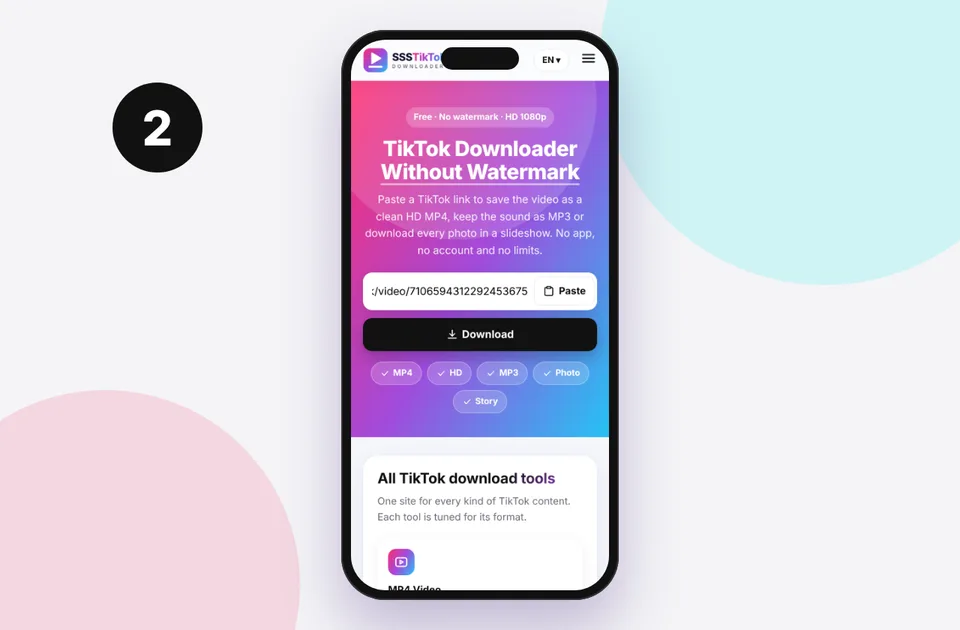
Come back here, tap Paste or long-press the input and paste, then press Download. Short links such as vm.tiktok.com and vt.tiktok.com are expanded automatically.
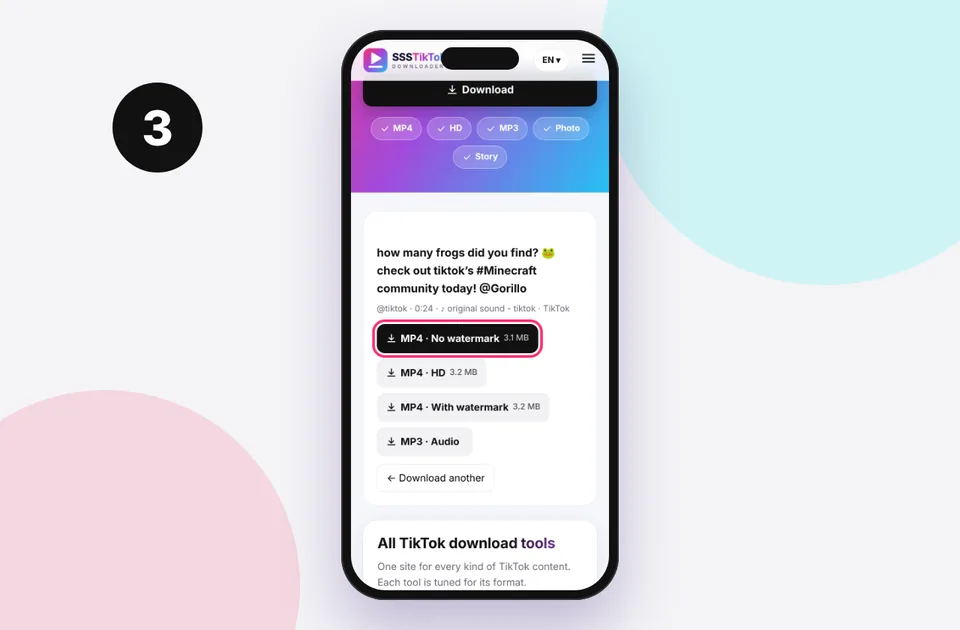
Choose MP4 · No watermark, HD or MP3. The file saves to your device. Not sure where it went? See where TikTok downloads are saved.
SSSTikTok Downloader is a free online tool that saves TikTok videos, sounds and photos to your phone or computer. TikTok's own Save video button adds a moving watermark with the creator's username, and it's often switched off for videos with licensed music. We fetch the original file that TikTok streams, so this TikTok downloader without watermark gives you a clean copy at the best quality the creator uploaded.
It's a handy way to save TikTok videos for watching offline on a flight, backing up your own clips before you delete them, keeping a recipe or tutorial, or editing your own content in CapCut, Premiere or iMovie without a logo in the corner. Read more in our complete TikTok download guide.
Yes. Every tool on the site is free, with no daily limit, no sign-up and no paid tier. Ads on the page cover server costs.
Copy the video link from TikTok's Share menu, paste it into the box at the top of this page and press Download. Choose “MP4 · No watermark” to save the clean original file.
No. The downloader runs in your browser on iPhone, Android, Windows, Mac, Linux and Chromebook. Nothing is installed on your device.
No. You only need the public link of the video. We never ask for your TikTok username or password.
We fetch the original upload, so there is no bouncing TikTok logo or username on your video.
When TikTok stores a 1080p file you get it untouched, with no re-compression.
Links are processed in seconds. Short vm.tiktok.com links are resolved automatically.
iPhone, Android, iPad, Windows, Mac, Linux and Chromebook, in any modern browser.
No account, no login and no download history. We never store the files you save.
One box handles MP4, HD, MP3 and slideshow photos, so you don't need a separate app.
The TikTok video download tool is the same everywhere, but where the file goes depends on your device. Pick yours for a step-by-step guide.
Open the link in Safari, tap Download, then find the file in Files → Downloads. Tap Share → Save Video to move it into Photos. Works on iOS 13 and later with no shortcut needed.
Read the iPhone & iPad guide →
Paste the link in Chrome or Samsung Internet and tap Download. The MP4 goes to your Downloads folder and shows up in Gallery or Google Photos within seconds.
Read the Android guide →
Copy the address from the browser bar on tiktok.com, paste it here and click Download. Use Save link as… if your browser plays the video instead of saving it.
Read the Windows, Mac & Chromebook guide →Also see: Mac · iPad · save to camera roll
Most problems come from the link itself or the video's privacy settings. Here are the quick fixes. The full list is in TikTok download errors and fixes.
How the main ways of saving TikTok videos compare.
| Feature | SSSTikTok (online) | Downloader apps | TikTok “Save video” |
|---|---|---|---|
| Watermark | None | Usually none | Logo + username |
| HD 1080p | When available | Varies | Often compressed |
| MP3 audio | Yes | Some apps | No |
| Slideshow photos | All photos | Some apps | As a video only |
| Install needed | No | Yes | TikTok app |
| Works on iPhone | Yes, in Safari | Limited on the App Store | Yes |
| Blocked by creator | Public videos only | Public videos only | Often disabled |
| Price | Free | Free with ads or paid | Free |
Want more detail? Read TikTok downloader app vs online and our honest best TikTok downloader roundup.
Creators own their videos. Downloading public clips for personal viewing is common, but re-uploading someone else's video, removing credit or using it in ads can infringe copyright and break TikTok's Terms of Service. Ask permission, tag the original creator, and use TikTok's Duet or Stitch features when you want to react to a video. Rights holders can request removal through our DMCA page. Learn more in is it legal to download TikTok videos?
22 answers to the questions people ask most. See the full FAQ for more.
Yes. Every tool on the site is free, with no daily limit, no sign-up and no paid tier. Ads on the page cover server costs.
Copy the video link from TikTok's Share menu, paste it into the box at the top of this page and press Download. Choose “MP4 · No watermark” to save the clean original file.
No. The downloader runs in your browser on iPhone, Android, Windows, Mac, Linux and Chromebook. Nothing is installed on your device.
No. You only need the public link of the video. We never ask for your TikTok username or password.
Yes. When TikTok has a 1080p or 720p version of the video, we offer it as the “MP4 · HD” option. We never upscale or re-encode, so you get the exact quality the creator uploaded.
Paste the link and pick “MP3 · Audio”, or use the dedicated TikTok MP3 downloader. You get the original soundtrack of the video as an audio file.
Yes. Paste a slideshow link and every photo appears in a gallery. Save them one by one or use “Download all” to grab every image.
On Android they land in the Downloads folder. On iPhone and iPad, Safari saves them to the Files app (Downloads), and you can move them to Photos. On a computer they go to your browser's download folder.
Safari saves to Files first. Open Files → Downloads, tap the video, then Share → Save Video. Our iPhone guide shows each step with pictures.
No. We can only fetch videos that are public. Private, friends-only, deleted or region-blocked videos cannot be downloaded, and we do not try to bypass those settings.
No. Files are streamed from TikTok's servers to your device. We do not host the videos or keep a list of what you download.
No. Downloading through a public link does not send a notification to the creator.
Saving public videos for personal, offline viewing is generally fine, but re-uploading or using someone else's content commercially without permission can break copyright law and TikTok's terms. Always credit and ask creators.
Make sure you copied the full link from Share → Copy link. Links that start with tiktok.com, vm.tiktok.com or vt.tiktok.com all work. Profile links and search pages are not videos.
Some videos use music that is muted in certain regions, or the original sound was removed after posting. Try the MP3 option to check, and see our no-sound fix guide.
Yes, as long as the story is still live and the account is public. Use the TikTok story downloader page.
Not while they are live. If the creator saves the stream as a regular video afterwards, you can download that video normally.
Yes. Videos up to 10 minutes and beyond work, though larger files take longer to save on slow connections.
Videos are MP4 (H.264), which plays on every phone, computer and editing app. Audio is MP3 or the original M4A track. Photos are JPG or WebP.
Yes. The site uses HTTPS, has no pop-up installers and never asks for logins. Only download the files you requested, and ignore any ad that asks you to install something.
There is no limit. If you send a lot of requests very quickly, you may see a short “wait a minute” message that protects the service for everyone.
No. We are an independent tool and are not associated with TikTok or ByteDance. TikTok is a trademark of its owner.
Updated October 31, 2026 · Written by the SSSTikTok team