
How to Remove the TikTok Watermark
Don't crop or blur it: download the clean original instead. Here's how, plus when it's okay to do so.
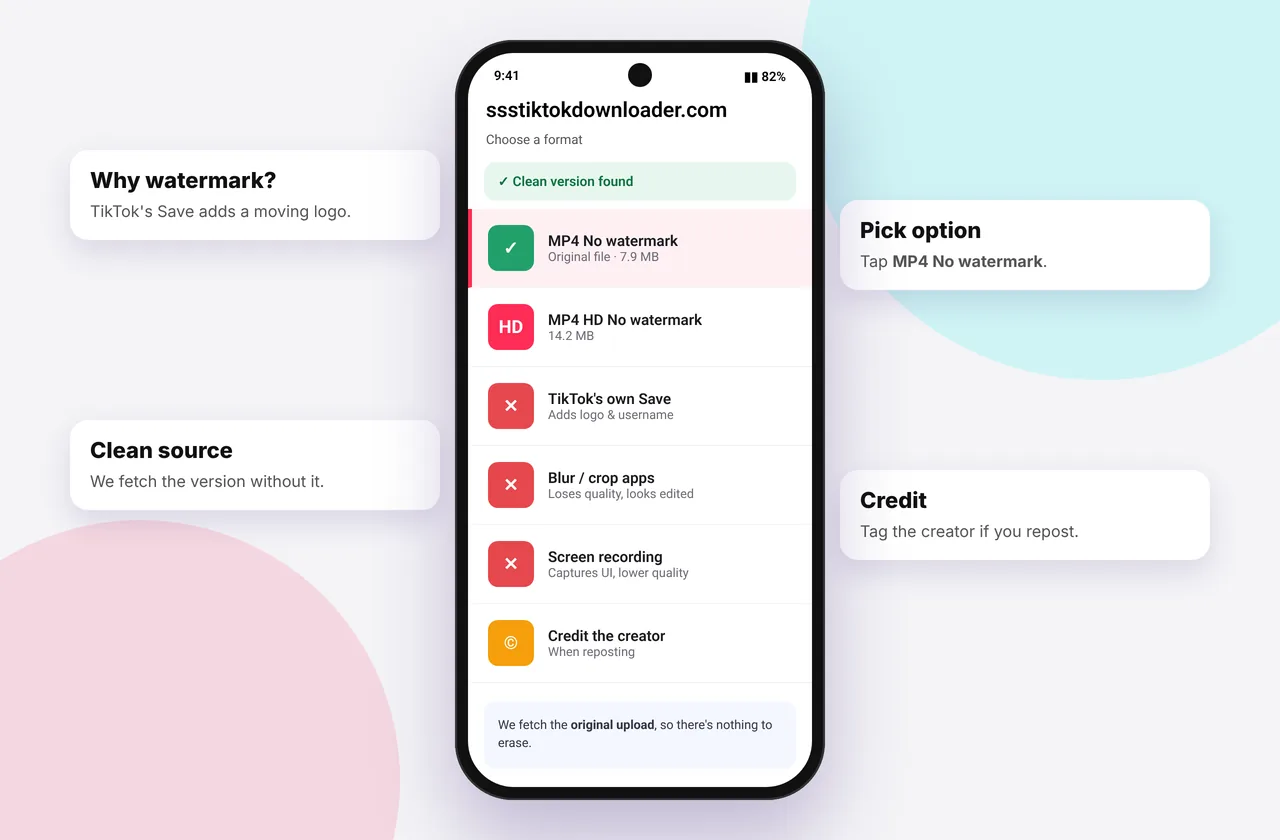
TikTok adds a moving watermark (the TikTok logo plus the creator's @username) whenever a video is saved through the app's own Save button. People want to remove it mainly to repost their own content on Instagram Reels or YouTube Shorts, where TikTok-branded videos may get less reach, or simply for a cleaner viewing experience.
The cleanest method is a TikTok downloader without watermark that fetches the original upload.
Why cropping, blurring and "eraser" apps are a bad idea
- Cropping cuts off part of the picture and lowers the resolution.
- Blurring leaves an obvious smudge that jumps around as the watermark moves.
- AI eraser apps often leave artefacts and re-compress the video.
- All three start from TikTok's already-compressed "Save video" copy.
The better way is to download the original file, which never had the watermark burned in.
Method 1: Download without watermark (recommended)
- Copy the video's link (Share → Copy link).
- Paste it into SSSTikTok and tap Download.
- Choose MP4 · No watermark, or HD for 1080p.
The result is the clean original, often sharper than TikTok's Save copy. Detailed steps: iPhone, Android and PC.
Method 2: Save your own video before posting
If it's your video, export it from the TikTok editor or keep the original from your camera roll. TikTok's post screen also has a Save to device toggle that saves your edited video, usually without the watermark, depending on app version and region. See save TikTok without posting.
Method 3: Edit from your raw footage
For your best work, re-edit from the raw clips in CapCut or another editor and export at 1080p. It gives the highest quality of all.
Removing watermarks from other people's videos: etiquette
Removing a watermark doesn't remove the creator's rights. The watermark exists to credit them. If you share someone else's video:
- Ask permission before reposting
- Credit them clearly with their @username and a link
- Never claim it as your own or use it in ads
- Prefer TikTok's Duet or Stitch to react to a video
See is it legal to download TikTok videos? for more.
Watermark FAQ for creators
Will Instagram penalise TikTok watermarks? Instagram has said it may show recycled content with watermarks from other apps less prominently. Uploading a clean version of your own video avoids that.
Related: TikTok MP4 downloader and the HD downloader.
Comparing the methods
| Method | Quality | Time | Leaves marks? |
|---|---|---|---|
| --- | --- | --- | --- |
| Download the clean original | Best | Seconds | No |
| Crop the video | Lower (loses edges) | Minutes | Changes framing |
| Blur or cover the watermark | Lower | Minutes | Yes, a visible smudge |
| AI eraser app | Varies | Minutes | Often artefacts |
Worked example: reposting your own TikTok to Reels
You posted a 25-second tutorial on TikTok and want it on Instagram. Copy the TikTok link, paste it into SSSTikTok and choose MP4 · HD. Save it to Photos and upload it to Instagram as a Reel. Because there's no TikTok logo, it looks native on Instagram, and you didn't have to re-edit anything.
Mistakes to avoid
- Removing the watermark from someone else's video and posting it as your own.
- Starting from TikTok's watermarked "Save video" copy and trying to clean it. Always download the original instead.
- Cropping a 9:16 video into another shape and cutting off captions.
Quick device reference
| Device | Best browser | Where files go | Full guide |
|---|---|---|---|
| iPhone | Safari | Files → Downloads, then Share → Save Video | iPhone guide |
| iPad | Safari | Files → Downloads | iPad guide |
| Android | Chrome or Samsung Internet | Download folder and Gallery | Android guide |
| Windows | Chrome, Edge or Firefox | This PC → Downloads (Ctrl + J) | PC guide |
| Mac | Safari or Chrome | Finder → Downloads | Mac guide |
Lost a file? Our page on where TikTok downloads are saved covers every brand and browser.
Every SSSTikTok tool
Safe, private and respectful
- No login, ever. We never ask for your TikTok password. Treat any site that does as a phishing risk.
- No installs. Everything runs in your browser. Ignore any advert that offers an app, extension or "codec".
- No history. Results are cached for about 15 minutes, then deleted. See the privacy policy.
- Public content only. We don't bypass private accounts or deleted posts.
- Credit creators. Saving for personal use is common, but reposting needs permission. Read is it legal to download TikTok videos?
Frequently asked questions
How do I remove the TikTok watermark?
Download the original video with the “MP4 · No watermark” option instead of editing the watermark out.
Is removing a TikTok watermark legal?
Downloading a clean copy for personal use is common. Reposting others' content without credit or permission can infringe copyright.
Does removing the watermark reduce quality?
Not with this method. You get the original file.
Can I remove the watermark from videos I already saved?
Not cleanly. Download the original again from the video link.