
How to Copy a TikTok Video Link
The first step of every download: grabbing the right link. Here's how on every device and app version.
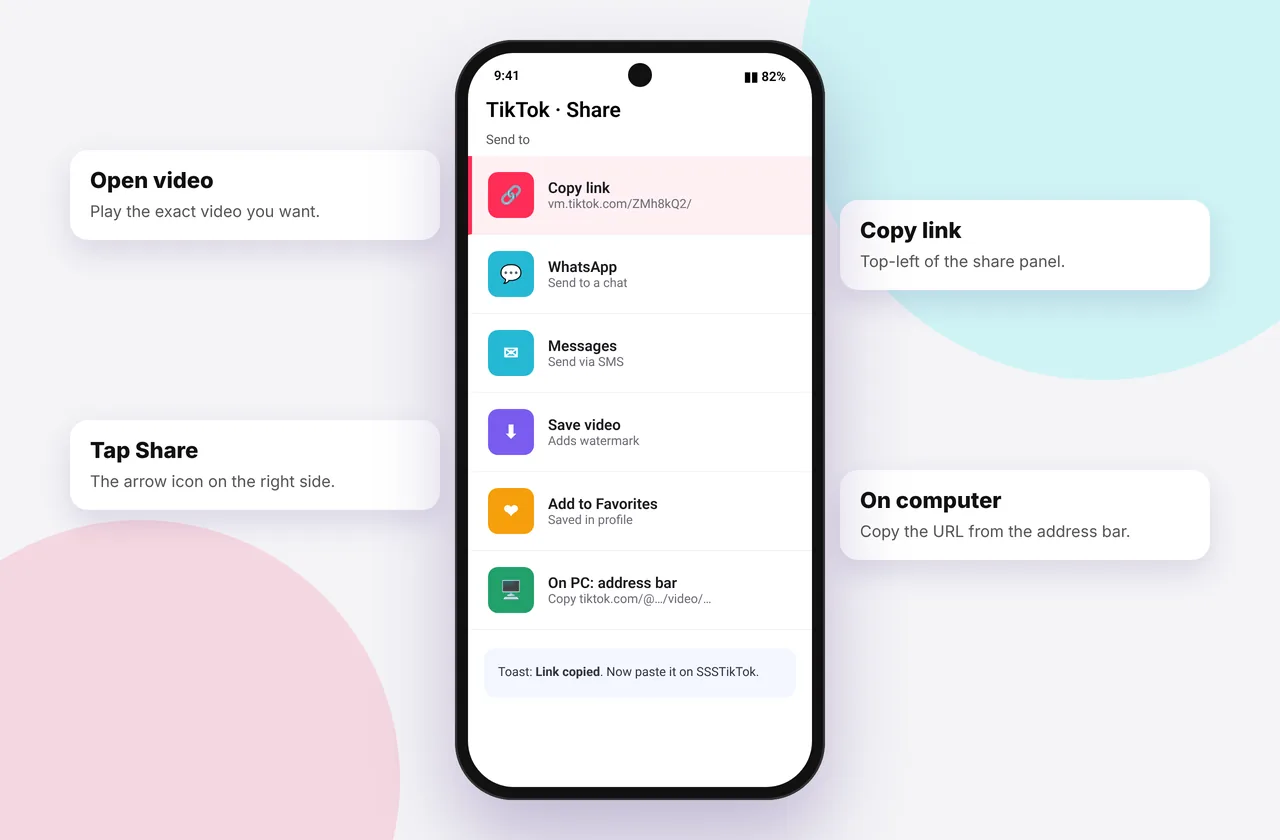
Every TikTok download starts with the video's link (URL). Copy the wrong thing, such as a profile page or a sound page, and you'll see "invalid link". Here's how to copy the right link every time.
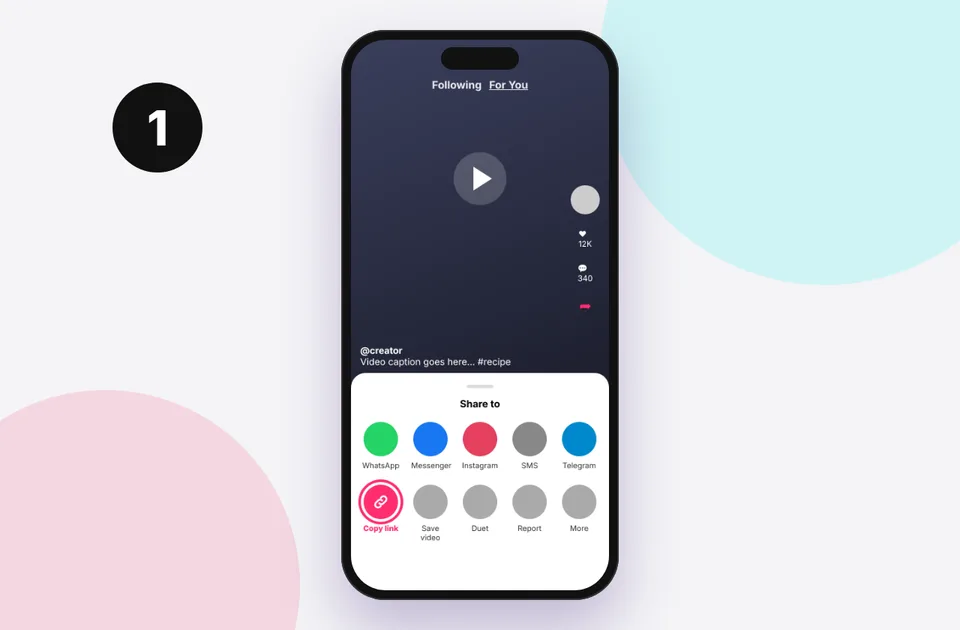
In the TikTok app (iPhone and Android)
- Open the video so it's playing full-screen.
- Tap the Share arrow on the right (below the comments icon).
- In the bottom row, tap Copy link. A "Copied" message appears.
Can't see Copy link? Swipe the bottom row left. On some versions it's under More or Others. If sharing is disabled for that video, the creator has turned off sharing. You can still open the video in a browser and copy the address bar (below).
For slideshows and stories
The steps are identical: open the slideshow or story, tap Share, then Copy link. Story links only work while the story is live (24 hours). See the story downloader.
On a computer (tiktok.com)
- Click the video so it opens on its own page. The address changes to tiktok.com/@user/video/…
- Click the address bar and copy it (Ctrl + C or ⌘ + C).
- Or use the Copy link button in the video's share panel.
In TikTok Lite
Tap Share → Copy link as usual. Lite links look the same and work fine.
From a message or another app
If a friend sent you a TikTok on WhatsApp or Messenger, long-press the link and choose Copy. You can paste the whole message into SSSTikTok, and we find the link automatically.
What a correct link looks like
- https://vm.tiktok.com/ZMabc123/
- https://www.tiktok.com/@creator/video/7290000000000000000
If your link contains /music/, /tag/ or ends at /@username, it's not a video. See TikTok link invalid.
Next step
Paste the link into the TikTok downloader or a specific tool such as the MP3 downloader. New to this? Read the complete download guide.
When sharing is turned off
Creators can disable sharing for a video. You'll see a limited share menu with no Copy link. Open tiktok.com in a browser, find the video on the creator's profile, click it and copy the address bar. If the video is private, though, no link will work. See private TikTok videos.
Copying several links quickly
On a computer, open TikTok in one tab and SSSTikTok in another. On each video, press Ctrl/⌘ + L, then Ctrl/⌘ + C, switch tabs, paste and download. On a phone, the Paste button on SSSTikTok reads your clipboard directly, so you only need Copy link in TikTok and one tap here.
Mistakes to avoid
- Copying from the caption or comments instead of the Share menu.
- Copying the profile address when you meant a single video.
- Sharing a link to a story after 24 hours. It will no longer work.
Quick device reference
| Device | Best browser | Where files go | Full guide |
|---|---|---|---|
| iPhone | Safari | Files → Downloads, then Share → Save Video | iPhone guide |
| iPad | Safari | Files → Downloads | iPad guide |
| Android | Chrome or Samsung Internet | Download folder and Gallery | Android guide |
| Windows | Chrome, Edge or Firefox | This PC → Downloads (Ctrl + J) | PC guide |
| Mac | Safari or Chrome | Finder → Downloads | Mac guide |
Lost a file? Our page on where TikTok downloads are saved covers every brand and browser.
Every SSSTikTok tool
Safe, private and respectful
- No login, ever. We never ask for your TikTok password. Treat any site that does as a phishing risk.
- No installs. Everything runs in your browser. Ignore any advert that offers an app, extension or "codec".
- No history. Results are cached for about 15 minutes, then deleted. See the privacy policy.
- Public content only. We don't bypass private accounts or deleted posts.
- Credit creators. Saving for personal use is common, but reposting needs permission. Read is it legal to download TikTok videos?
Frequently asked questions
Where is the Copy link button in TikTok?
Tap Share (the arrow), then Copy link in the bottom row. Swipe left if you can't see it.
Why can't I copy a TikTok link?
The creator may have disabled sharing. Open the video on tiktok.com and copy the address bar.
Do short vm.tiktok.com links work?
Yes.
How do I copy a TikTok link on PC?
Open the video on its own page and copy the address bar.