
TikTok runs on sound. A trending clip is often remembered for its audio long before anyone remembers the visuals, and many people come to TikTok to discover music. Our TikTok to MP3 downloader lets you keep that audio as a standalone file. Paste the link of any public video, press Download and choose MP3 · Audio. The audio button appears first on this page, so it's one tap.
It is the quickest way to save a sound you want to hear offline, use as a ringtone or alarm, transcribe for notes, or reference while you make your own video. You do not need the TikTok app, an account or any converter software.
How to use it in 3 steps
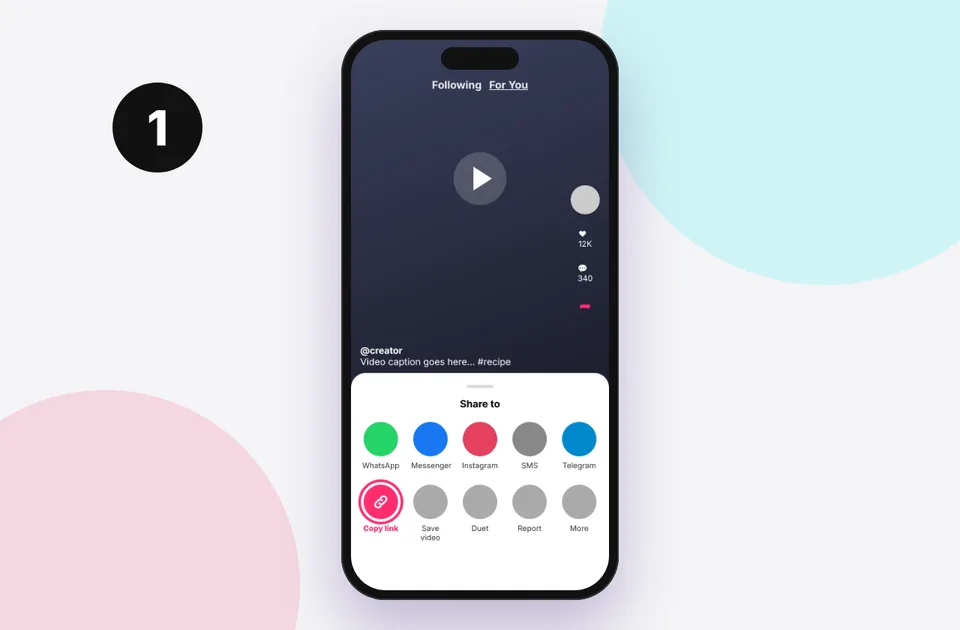
1. Copy the link
In TikTok tap Share → Copy link, or copy the address bar on a computer.
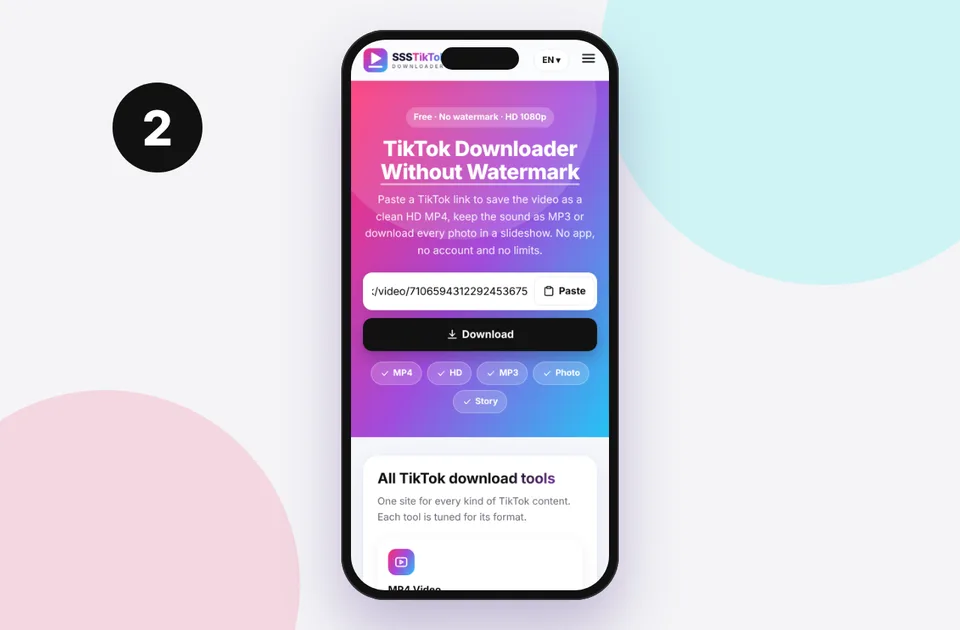
2. Paste and press Download
Paste into the box above. Short vm.tiktok.com and vt.tiktok.com links work too.
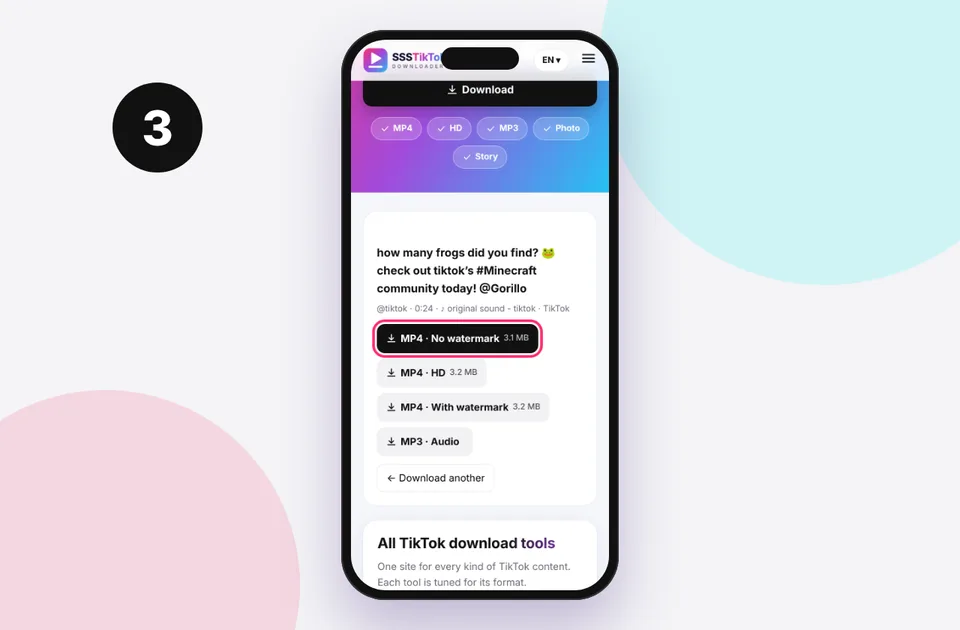
3. Choose and save
Pick the format you need and the file saves to your device's Downloads.
What you get when you download TikTok audio
When a creator posts a video, TikTok stores the soundtrack separately from the picture. We request that original track instead of recording or re-encoding the video, so the audio you save sounds exactly like it does in the app. Most tracks are delivered as MP3 or the original M4A (AAC) stream, typically at 128 kbps, which is what TikTok itself streams.
- Original sounds recorded by a creator, such as voice-overs, comedy bits and ASMR.
- Songs used in the video, in the exact cut and length the creator used, often 15 to 60 seconds.
- Mixed audio, if the creator talked over the music. You get the combined track as heard in the video.
Want the full-length song? TikTok only stores the snippet used in the video. For the complete track, tap the sound name in TikTok to see the song and artist, then buy or stream it from a music service. This also supports the artist.
How to convert TikTok to MP3 on any device
The steps are the same everywhere, but where the file ends up depends on your device.
iPhone and iPad
Open this page in Safari, paste the link and tap MP3 · Audio. Safari asks whether to download. Tap Download and the file goes to Files → Downloads. From there you can play it, share it to a music app or use GarageBand to make a ringtone. Our iPhone guide has screenshots of every step.
Android
In Chrome or Samsung Internet, tap the MP3 button and the audio saves to your Download folder. Most music players pick it up automatically. If yours doesn't, open the Files app and look in Downloads. See where TikTok downloads are saved for every brand.
Windows, Mac and Chromebook
Click the MP3 button. If your browser plays the audio in a new tab instead of saving it, right-click the button and choose Save link as…. The file goes to your Downloads folder.
Popular ways to use TikTok audio
- Ringtones and alarms. A 20-second hook makes a great ringtone. Follow our TikTok sound to ringtone guide for iPhone and Android.
- Offline listening. Save the sounds you love for flights, commutes or places with poor signal.
- Study and language practice. Voice-overs and explainers are easier to replay and transcribe as audio files.
- Editing your own content. Bring an original sound you recorded into CapCut, Premiere or Audacity. Only reuse other people's sounds where you have permission or where TikTok's own sound library allows it.
- Identifying a song. Run the clip through a song-recognition app to find the full track.
MP3 vs keeping the full video
If you only need the audio, MP3 files are much smaller, roughly 0.5 to 1 MB per minute instead of 5 to 15 MB for an HD video. They also play in every music app and car stereo. If you might want the visuals later, use the TikTok MP4 downloader and keep both. Our guide to extracting TikTok audio without video explains the difference between MP3 and M4A in more detail.
If the MP3 is silent or will not download
A silent file almost always means the music was muted by TikTok, usually because of a copyright claim or a regional licence, so there is no audio left to download. Check the video in the app: if it shows "This sound isn't available", the track has been removed. For other problems, such as the button doing nothing or an "invalid link" message, see TikTok video has no sound after download and our full list of download errors and fixes.
A note on music rights
Songs on TikTok are licensed for use inside TikTok. Saving a sound for personal listening is common, but uploading it elsewhere, selling it or using it in a commercial video can infringe the artist's copyright. If you're unsure, read is it legal to download TikTok videos?.
Supported TikTok links
Paste any of these. You can even paste a whole message, and the link is picked out automatically:
- Share links: vm.tiktok.com/… and vt.tiktok.com/…
- Video pages: tiktok.com/@creator/video/…
- Photo posts: tiktok.com/@creator/photo/…
- Mobile web: m.tiktok.com/v/…
Profiles, sound pages, hashtags and live streams aren't single posts, so they can't be downloaded. If you see an error, read TikTok link invalid or the full errors and fixes list.
Quick device reference
| Device | Best browser | Where files go | Full guide |
|---|---|---|---|
| iPhone | Safari | Files → Downloads, then Share → Save Video | iPhone guide |
| iPad | Safari | Files → Downloads | iPad guide |
| Android | Chrome or Samsung Internet | Download folder and Gallery | Android guide |
| Windows | Chrome, Edge or Firefox | This PC → Downloads (Ctrl + J) | PC guide |
| Mac | Safari or Chrome | Finder → Downloads | Mac guide |
Lost a file? Our page on where TikTok downloads are saved covers every brand and browser.
Safe, private and respectful
- No login, ever. We never ask for your TikTok password. Treat any site that does as a phishing risk.
- No installs. Everything runs in your browser. Ignore any advert that offers an app, extension or "codec".
- No history. Results are cached for about 15 minutes, then deleted. See the privacy policy.
- Public content only. We don't bypass private accounts or deleted posts.
- Credit creators. Saving for personal use is common, but reposting needs permission. Read is it legal to download TikTok videos?
Frequently asked questions
Is the TikTok to MP3 converter free?
Yes. It's completely free with no limits and no sign-up.
What audio quality will I get?
You get the same audio TikTok streams, usually AAC or MP3 at about 128 kbps. We don't re-encode it, so no quality is lost.
Can I download the full song?
No. TikTok only stores the clip used in the video. Find the song name in the app and get the full track from a music service.
Why is the MP3 file M4A instead?
Some tracks are delivered in their original M4A (AAC) container. It plays in every modern music app. Rename it or convert it only if a specific device needs MP3.
Can I convert a TikTok slideshow to MP3?
Yes. Photo slideshows usually have a soundtrack, and the MP3 option downloads it alongside the photos.
Does it work on iPhone?
Yes. Use Safari on iOS 13 or later, and the file appears in Files → Downloads.