
Why Are My TikTok Downloads Low Quality?
Blurry or pixelated TikTok downloads have a few specific causes. Here's how to get the sharpest version possible.
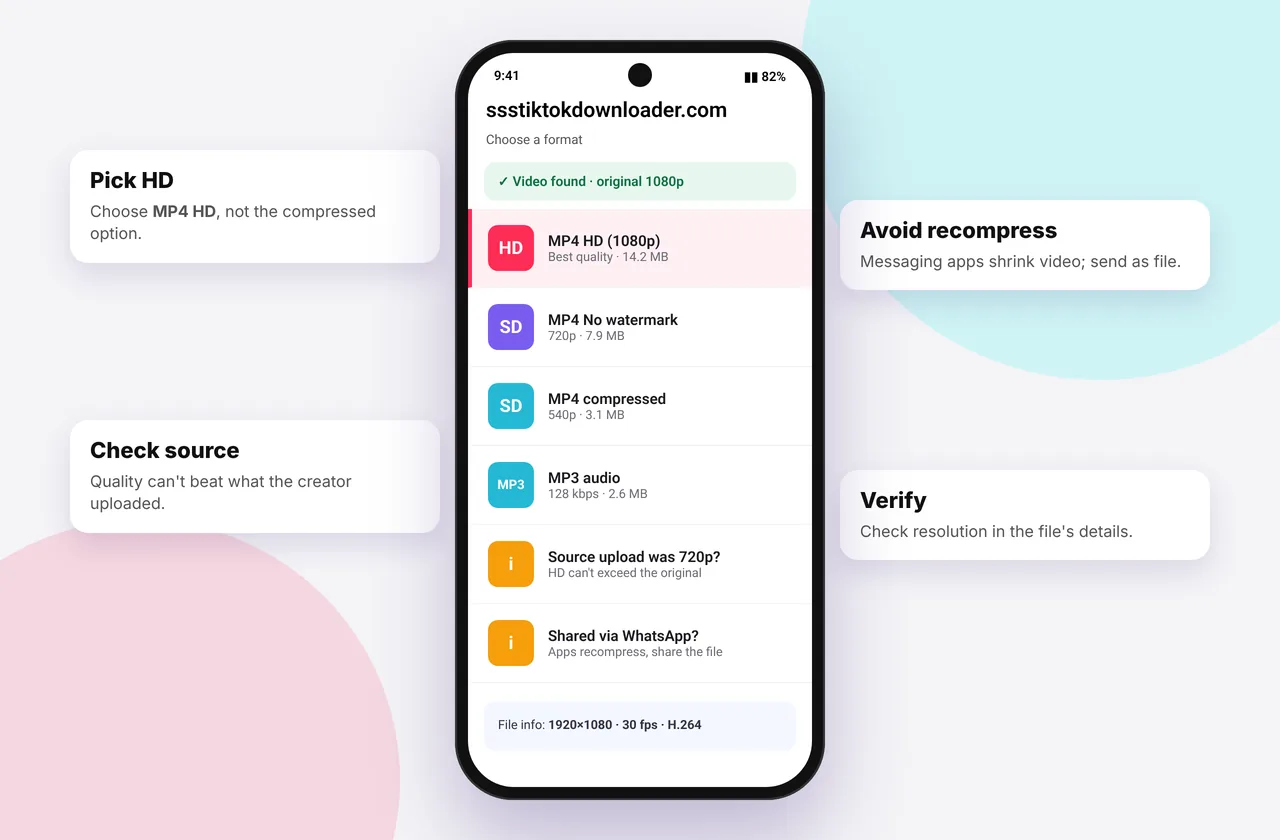
If your downloaded TikTok looks worse than you expected, one of five things is usually responsible. Some you can fix, and some come from the original upload.
When you download TikTok videos with our tool, it always offers the highest resolution TikTok has.
1. You didn't pick the HD option
The default MP4 · No watermark button gives TikTok's standard rendition, often 720p. If an MP4 · HD button appears, choose it for 1080p. The HD downloader always puts it first.
2. The creator uploaded in low quality
If the creator filmed on an older phone, used a screen recording, uploaded with Data saver on or reposted someone else's video, TikTok only keeps a low-resolution file. No HD button means no HD file exists, and upscalers can't create real detail. See HD vs SD.
3. A messaging app compressed it
WhatsApp, Messenger, Instagram DMs and Telegram (when sent as a video) re-compress files heavily. If a video looked fine before you shared it, send it as a document or file instead.
4. You saved a repost or duet
Reposts, stitches and duets are re-encoded by TikTok. Find the original video by tapping the creator's name or the "original" tag and download that instead.
5. Your player is scaling it badly
A vertical 1080×1920 video stretched across a landscape TV looks soft. Play it in portrait on a phone or tablet, or use VLC, which scales cleanly.
Check what you actually have: on iPhone open the video in Photos and swipe up to see the resolution. On Android, check Details in Gallery. 1080 × 1920 is full HD.
Tips for creators: make your own downloads sharper
- Turn off Data saver in TikTok settings
- Turn on Upload HD in the post screen
- Film at 1080p 30 fps. 4K doesn't help on TikTok.
- Avoid heavy filters that add noise
Related
Worked example
You download a travel clip and it looks soft on your laptop. Swiping up in Photos shows 720 × 1280, and there was no HD button. The creator uploaded in 720p, so that's the best version available. A second clip from the same creator shows an HD option, and the 1080p download is noticeably sharper on the laptop screen.
Checking quality before sharing
Before you post or send a video, check the resolution (see above) and play it full-screen on the device you'll use. If you're editing, export at the same resolution as the source. Exporting 720p as 1080p doesn't add detail, it just makes the file bigger.
Mistakes to avoid
- Downloading a duet or stitch when you wanted the original. Duets are re-encoded at a lower bitrate.
- Watching a vertical video stretched on a TV and blaming the download.
- Using screen recordings as a "backup". They're always lower quality than the original file.
Quick device reference
| Device | Best browser | Where files go | Full guide |
|---|---|---|---|
| iPhone | Safari | Files → Downloads, then Share → Save Video | iPhone guide |
| iPad | Safari | Files → Downloads | iPad guide |
| Android | Chrome or Samsung Internet | Download folder and Gallery | Android guide |
| Windows | Chrome, Edge or Firefox | This PC → Downloads (Ctrl + J) | PC guide |
| Mac | Safari or Chrome | Finder → Downloads | Mac guide |
Lost a file? Our page on where TikTok downloads are saved covers every brand and browser.
Every SSSTikTok tool
Safe, private and respectful
- No login, ever. We never ask for your TikTok password. Treat any site that does as a phishing risk.
- No installs. Everything runs in your browser. Ignore any advert that offers an app, extension or "codec".
- No history. Results are cached for about 15 minutes, then deleted. See the privacy policy.
- Public content only. We don't bypass private accounts or deleted posts.
- Credit creators. Saving for personal use is common, but reposting needs permission. Read is it legal to download TikTok videos?
Frequently asked questions
Why does my TikTok download look blurry?
You may have chosen the standard version, the original was low resolution, or a messaging app compressed it.
How do I download TikTok in HD?
Choose MP4 · HD when it appears, or use the HD downloader page.
Can I make a low-quality TikTok HD?
Not really. Upscaling enlarges the image but can't recover lost detail.
Does WhatsApp reduce quality?
Yes. Send the video as a document to avoid compression.