
How to Save TikTok Videos to Your Camera Roll
Downloaded a TikTok but can't see it in Photos or Gallery? Here's how to get it into your camera roll on any phone.
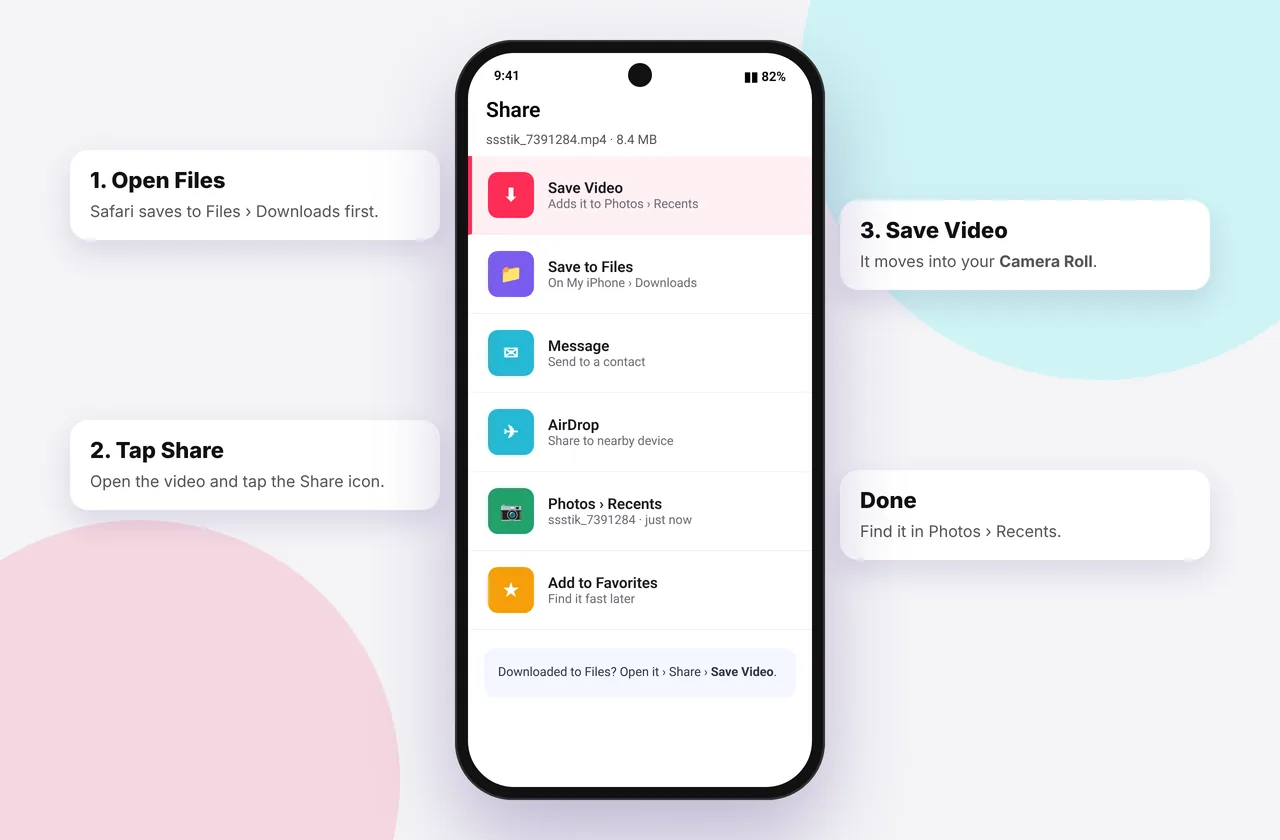
"Camera roll" means the main photo library on your phone: Photos on iPhone and Gallery or Google Photos on Android. Downloading a TikTok is only half the job. This guide gets the file into your camera roll so it sits alongside your own photos and videos, ready to edit or share.
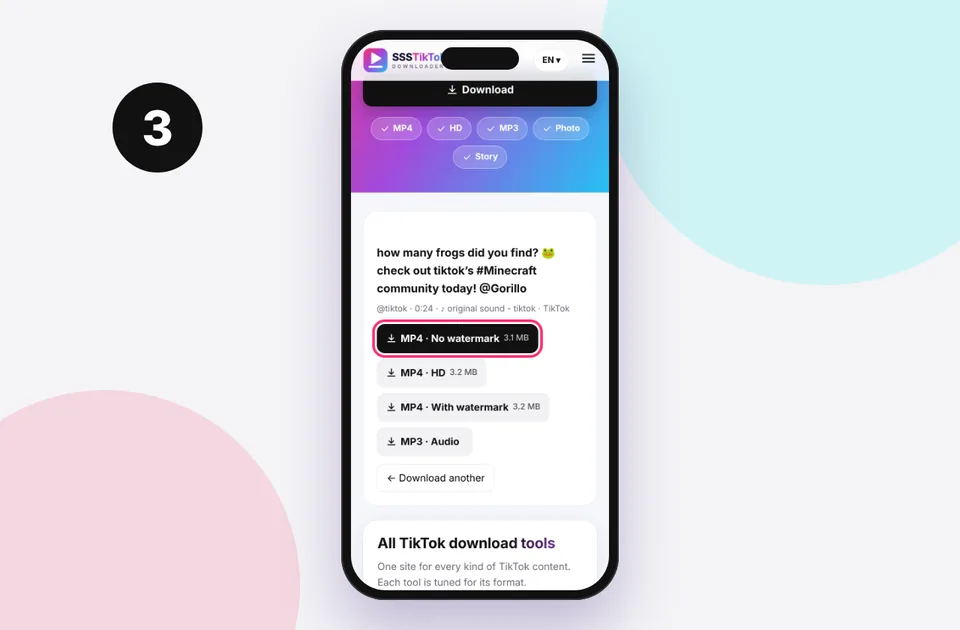
Start with our free TikTok downloader without watermark to get a clean file, then move it to your camera roll.
iPhone: from Files to Photos
Safari always puts downloads in Files first. To move a video to the camera roll:
- Download the video from ssstiktokdownloader.com (see the iPhone guide).
- Open Files → Browse → Downloads.
- Tap the video, tap Share and then Save Video.
Batch-save several videos on iPhone
- In Files → Downloads, tap the ⋯ button and then Select.
- Tick every video you want.
- Tap Share → Save [n] Videos.
They appear in Photos → Recents in the order you saved them. Delete the copies in Files to free up space.
If "Save Video" doesn't appear, the share sheet may be scrolled. Swipe up on the sheet to see all actions, or update iOS if the file is HEVC.
Android: it's already there
On Android, downloads go to the Download folder, which most gallery apps show automatically:
- Samsung Gallery: Albums → Download
- Google Photos: Library → Download. Turn on backup for that folder if you want it in the cloud.
- Xiaomi, Oppo and Vivo galleries: Albums → Downloads
If the video isn't showing, open the gallery app's settings and make sure hidden or "other" albums are visible, or restart the app. See the Android guide.
Mac or PC to phone
Downloaded on a computer? AirDrop from a Mac puts the video straight into iPhone Photos. On Windows, use the Phone Link app or upload to Google Photos and it will appear on your Android phone. See the Mac and PC guides.
Keep the best quality
Saving into Photos doesn't reduce quality, but sending through WhatsApp or Messenger does. Choose the HD download first, and when sharing, send as a document or file to avoid compression.
Organise your saved TikToks
- Create an album called TikTok in Photos or Gallery so saved clips don't clutter your camera roll.
- On iPhone, saved videos keep the download date rather than the posting date. Add a caption in the info panel if you need to remember the source.
- Credit creators when you share. Note the @username before you close TikTok.
Fixes when a video won't save
- "Unable to save": low storage. Free some space and try again.
- Video saves but has no sound: the music was muted by TikTok (no sound fix).
- Video looks blurry in Photos: you saved a low-resolution version. See low quality downloads.
- Can't find the file at all: see where TikTok downloads are saved.
Why iPhone uses Files first
Since iOS 13, Safari can download any file type: PDFs, ZIPs, audio and video. Because those aren't all photos, Apple sends every browser download to Files. It's a privacy and organisation choice: the photo library only contains what you deliberately add. The upside is that you can keep TikToks out of your camera roll if you prefer, and only move the ones you want.
Speed up the move with a Shortcut (optional)
If you save many videos, Apple's Shortcuts app can do the move in one tap:
- Open Shortcuts and tap +.
- Add the action Get Contents of Folder and choose Downloads.
- Add Filter Files where *File Extension* is *mp4*.
- Add Save to Photo Album (choose an album such as "TikTok").
- Optionally add Delete Files to clear the copies from Downloads.
Name it "Move TikToks to Photos" and run it whenever you've finished downloading. This is a shortcut you build yourself with Apple's own actions. It doesn't download anything from TikTok, so it won't break when TikTok changes.
Creating a TikTok album
iPhone: open Photos → Albums → + → New Album, name it "TikTok", then select videos in Recents and tap Add to → TikTok. Videos stay in Recents too, because albums only point to them.
Samsung: open Gallery → Albums → + → Album, then move or copy videos into it from the Download album.
Google Photos: open Library → New album. If you only want TikToks backed up, turn on backup for the Download device folder under Library → Photos on device.
Getting dates and order right
Downloaded videos get the download date, not the date the creator posted. If you want them in posting order, download them in that order, or rename them. On iPhone you can tap the ⓘ button on a video in Photos and choose Adjust to change its date and time, which is useful for keeping a series of recipe videos in sequence.
Sharing from the camera roll without losing quality
| Sharing method | Quality kept? | Tip |
|---|---|---|
| --- | --- | --- |
| AirDrop | Yes, full quality | Best for Apple devices nearby |
| iMessage | Mostly | Turn off Low Quality Image Mode in Settings → Messages |
| WhatsApp (as video) | No, compressed | Send as Document instead |
| Telegram (as file) | Yes | Choose "Send as file" |
| Google Photos link | Yes | Share an album link |
Storage tips
HD TikToks run 15–30 MB per minute, so a hundred saved videos can easily take 1–2 GB. To manage space:
- On iPhone, turn on Settings → Photos → Optimise iPhone Storage if you use iCloud Photos. Full-size originals stay in iCloud.
- On Android, use Google Photos' Free up space after backup.
- Keep only the clips you really want. Delete the duplicates left in Files or Downloads after moving them.
Mistakes to avoid
- Saving the same video twice (once from Files and again from Safari's list). Check Recents before you save again.
- Deleting from Files before saving to Photos. Always confirm the video plays in Photos first.
- Turning off "Save to device" in TikTok and expecting the app to save. That setting only affects your own posts, not downloads from this site.
For where files land before you move them, see where TikTok downloads are saved. For the best source quality, start from the HD downloader.
Every SSSTikTok tool
Safe, private and respectful
- No login, ever. We never ask for your TikTok password. Treat any site that does as a phishing risk.
- No installs. Everything runs in your browser. Ignore any advert that offers an app, extension or "codec".
- No history. Results are cached for about 15 minutes, then deleted. See the privacy policy.
- Public content only. We don't bypass private accounts or deleted posts.
- Credit creators. Saving for personal use is common, but reposting needs permission. Read is it legal to download TikTok videos?
Frequently asked questions
Why isn't my TikTok download in Photos on iPhone?
Safari saves to Files. Open the file and tap Share → Save Video.
Can I save several TikToks to Photos at once?
Yes. Select them in Files → Downloads, then tap Share → Save Videos.
Does saving to the camera roll lower quality?
No. Quality drops only when you send through messaging apps.
Where is the camera roll on Android?
It's your Gallery or Google Photos app. Downloads appear in the Download album.