
How to Turn a TikTok Sound into a Ringtone
Love a TikTok sound? Make it your ringtone, notification or alarm on iPhone or Android in about five minutes.
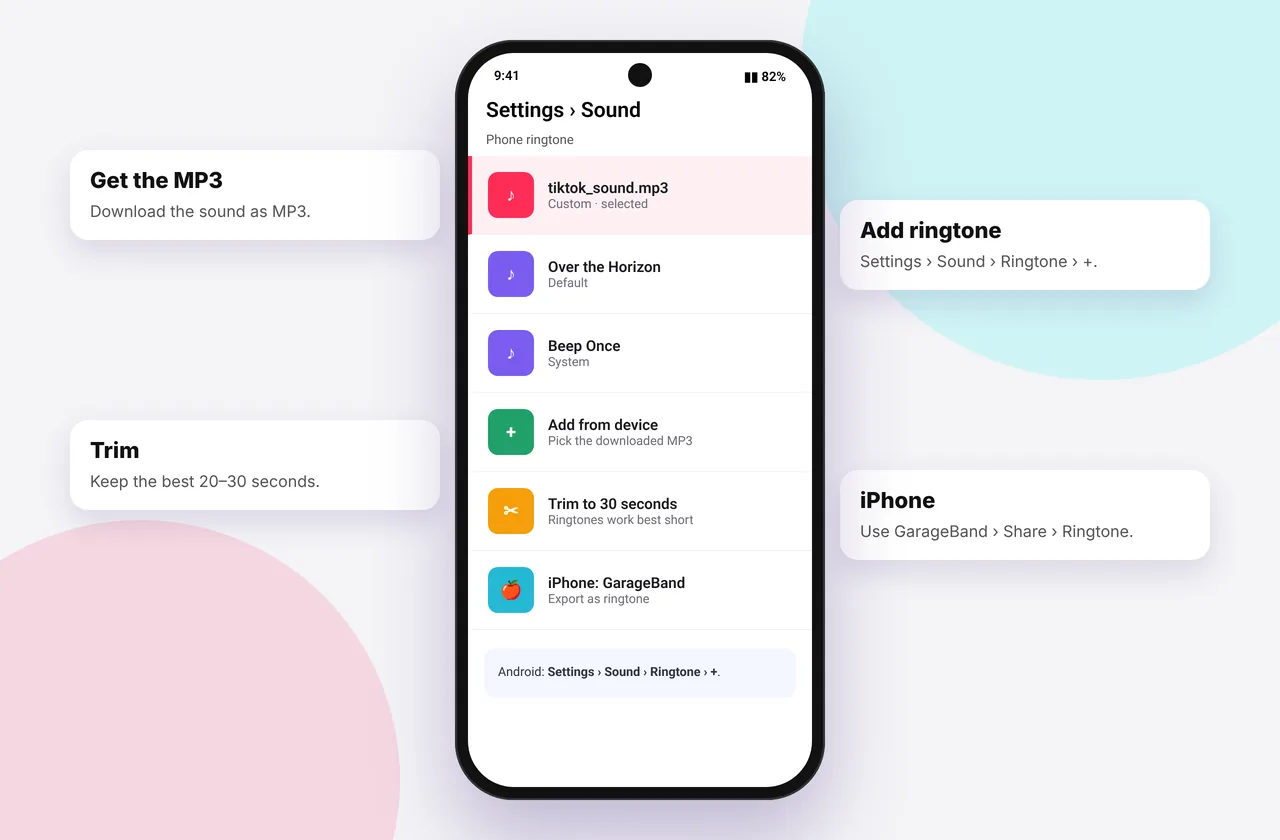
Trending TikTok sounds make great ringtones: short, catchy and instantly recognisable. The process has three parts: download the audio, trim it and set it as your ringtone. Android makes this easy, and iPhone takes a few extra taps with Apple's free GarageBand app.
Grab the sound first with our free TikTok video downloader, which also offers an MP3 option.
Step 1: Download the TikTok sound as MP3
- Copy the video link (Share → Copy link).
- Paste it into the TikTok MP3 downloader and tap MP3 · Audio.
- The file saves to Downloads on Android or Files → Downloads on iPhone.
Step 2 and 3 on Android
- Most TikTok sounds are already short. If yours is longer than 30 seconds, trim it with a free app such as Ringtone Maker or MP3 Cutter, or in Samsung Voice Recorder on Galaxy phones.
- Open Settings → Sound and vibration → Ringtone.
- Tap + or Add from device, browse to Download and choose the file.
On Pixel phones: Settings → Sound & vibration → Phone ringtone → My sounds → +. To set a sound for a single contact, open the contact → ⋮ → Set ringtone.
Steps 2 and 3 on iPhone (GarageBand method)
iPhone ringtones must be 30 seconds or shorter and are created with GarageBand (free from Apple).
- Open GarageBand and create a new project with any instrument, such as Audio Recorder.
- Tap the Tracks view button (the brick icon), then the Loop icon at the top right → Files → Browse items from the Files app. Pick your TikTok MP3 from Downloads.
- Drag the audio onto the timeline. Trim it to under 30 seconds by dragging its edges.
- Tap the down arrow → My Songs to save.
- Long-press the project → Share → Ringtone → name it → Export.
- Tap Use sound as… → Standard Ringtone, or set it later in Settings → Sounds & Haptics → Ringtone.
Tip: turn off the metronome in GarageBand before trimming, and set the project length to 8 bars or more so your clip isn't cut short.
Choosing the perfect clip
- Start on the hook, the bit everyone recognises, not on silence.
- Keep it to 10–20 seconds. Ringtones loop.
- Avoid clips with loud bass distortion. Phone speakers exaggerate it.
- Voice-based sounds also work brilliantly as notification tones.
Alarms and notifications
Android lets you choose any audio file for alarms in the Clock app: Alarm → Sound → + Add new. On iPhone, ringtones you create also appear under Clock → Alarm → Sound and Settings → Sounds & Haptics → Text Tone.
Troubleshooting
- The MP3 is silent: TikTok muted the music. Try another video using the same sound (no sound fix).
- GarageBand won't import: make sure the file is in Files and not still downloading. M4A files work too.
- The ringtone doesn't appear: it may be longer than 30 seconds on iPhone, so trim and export again.
A note on copyright
Using a song as your own ringtone is personal use. Selling ringtones made from TikTok sounds, or distributing them, isn't allowed without a licence. See is it legal to download TikTok videos?. Related: TikTok audio without video and where TikTok downloads are saved.
Worked example: a 15-second ringtone on Android
You've downloaded a trending sound that's 42 seconds long. Open a trimmer app, set the start at the first beat of the chorus (say 0:08) and the end at 0:23, add a 1-second fade-out so the loop isn't jarring, and save it as an MP3. Then go to Settings → Sound → Ringtone → + and pick the new file. It takes about two minutes.
Notification tones vs ringtones
Notification sounds should be 1–3 seconds. Short voice clips and sound effects from TikTok work brilliantly. Trim them tightly so there's no silence at the start, or the alert will feel delayed. On Android, set them under Settings → Sound → Default notification sound. On iPhone, export them from GarageBand the same way as a ringtone and pick them under Text Tone.
Mistakes to avoid
- Starting the clip on silence, so the phone seems to ring late.
- Exporting a ringtone longer than 30 seconds on iPhone, which won't appear in the list.
- Using a very loud, bass-heavy clip. It distorts on phone speakers.
Quick device reference
| Device | Best browser | Where files go | Full guide |
|---|---|---|---|
| iPhone | Safari | Files → Downloads, then Share → Save Video | iPhone guide |
| iPad | Safari | Files → Downloads | iPad guide |
| Android | Chrome or Samsung Internet | Download folder and Gallery | Android guide |
| Windows | Chrome, Edge or Firefox | This PC → Downloads (Ctrl + J) | PC guide |
| Mac | Safari or Chrome | Finder → Downloads | Mac guide |
Lost a file? Our page on where TikTok downloads are saved covers every brand and browser.
Every SSSTikTok tool
Safe, private and respectful
- No login, ever. We never ask for your TikTok password. Treat any site that does as a phishing risk.
- No installs. Everything runs in your browser. Ignore any advert that offers an app, extension or "codec".
- No history. Results are cached for about 15 minutes, then deleted. See the privacy policy.
- Public content only. We don't bypass private accounts or deleted posts.
- Credit creators. Saving for personal use is common, but reposting needs permission. Read is it legal to download TikTok videos?
Frequently asked questions
Can I use a TikTok sound as my iPhone ringtone?
Yes. Download the MP3, then use GarageBand to export it as a ringtone under 30 seconds.
How long can a ringtone be?
Up to 30 seconds on iPhone. Android has no strict limit, but shorter is better.
Do I need to pay for any app?
No. GarageBand and Android's built-in settings are free.
Can I set different TikTok sounds for different contacts?
Yes, on both iPhone (Contacts → Edit → Ringtone) and Android.