
Where Are TikTok Downloads Saved?
The exact folder your TikTok downloads land in on every phone, tablet and computer, and how to find a missing file.
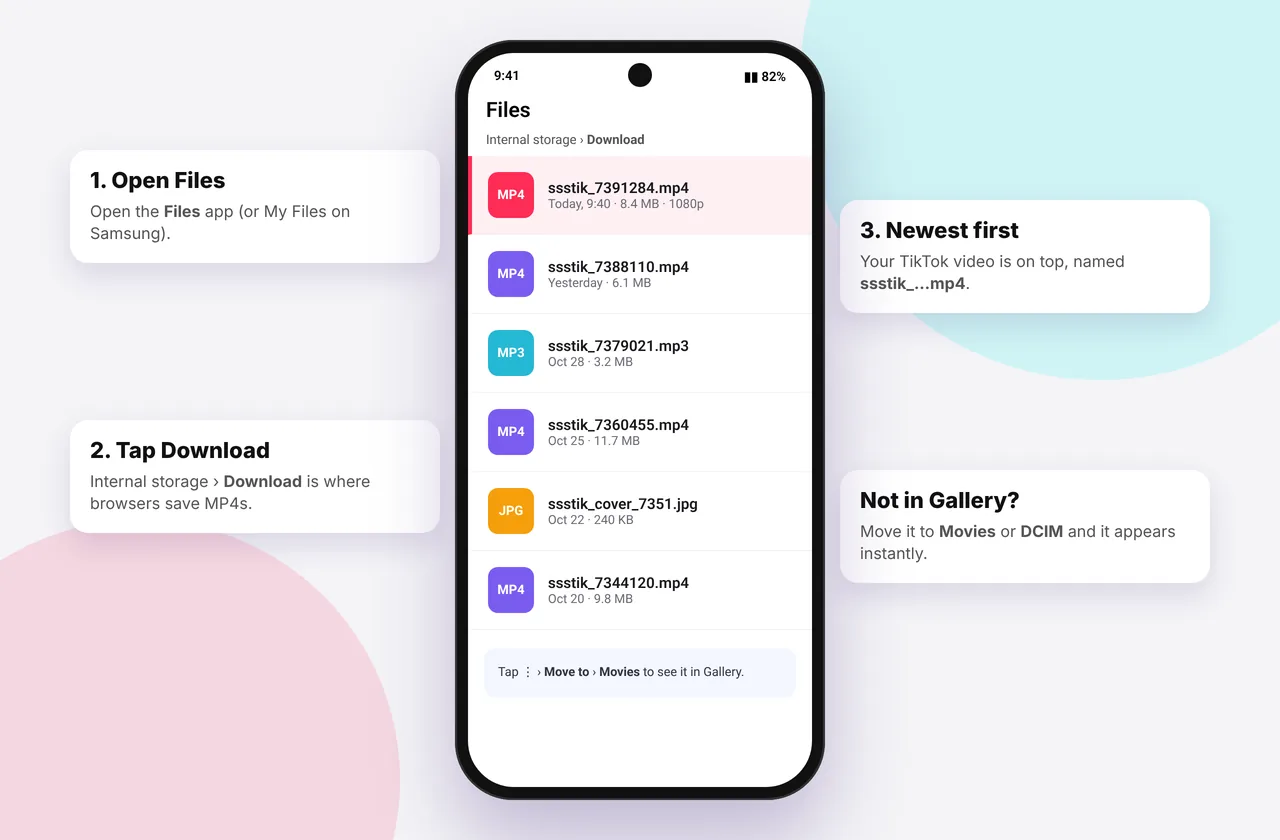
You pressed Download, saw a progress bar, and now the video seems to have disappeared. Don't worry: it's almost always in a Downloads folder you just haven't looked in. Here's exactly where to find it on each device.
Every file you save with our TikTok video downloader lands in the folders described below.
Quick answer by device
| Device | Where the file goes | How to open it |
|---|---|---|
| --- | --- | --- |
| iPhone / iPad (Safari) | Files → Downloads | Safari's blue download arrow, or the Files app |
| Android (Chrome) | Internal storage → Download | Files app → Downloads, or Gallery → Download album |
| Windows | C:\Users\you\Downloads | Ctrl + J in the browser, or File Explorer → Downloads |
| Mac | ~/Downloads | ⌥ + ⌘ + L in Safari, or Finder → Downloads |
| Chromebook | My files → Downloads | Files app |
iPhone and iPad in detail
Safari saves to iCloud Drive → Downloads by default, or On My iPhone → Downloads if you changed it. Check in Settings → Safari → Downloads. To put a video in your photo library, open it and tap Share → Save Video. Full steps are in the iPhone guide and save to camera roll.
Using Chrome on iPhone? Downloads appear in Chrome's ⋯ → Downloads list and in Files → On My iPhone → Chrome.
Android in detail
Chrome, Samsung Internet and Firefox save to the shared Download folder:
- Samsung: My Files → Downloads, and Gallery → Albums → Download
- Pixel: Files by Google → Downloads, and Google Photos → Library → Download
- Xiaomi: File Manager → Downloads, and Gallery → Downloads album
You can change the folder in Chrome under ⋮ → Settings → Downloads. See the Android guide.
Windows and Mac in detail
Browsers use your user Downloads folder unless you set otherwise. Press Ctrl + J (Windows) or ⌘ + ⇧ + J (Chrome on Mac) to see recent downloads and click Show in folder. Change the location in your browser's settings. See the PC and Mac guides.
Where does TikTok's own "Save video" go?
If you used Share → Save video inside the TikTok app (not our site), the clip goes straight to your camera roll: Photos on iPhone, or the DCIM/TikTok or Movies/TikTok folder on Android. These copies have TikTok's watermark. For clean files, use the MP4 downloader.
Still can't find it?
- Search by file name. Downloads are named after the video ID or title. Search "tiktok" or ".mp4" in Files or Finder.
- Check the download actually finished. A download interrupted by a weak connection leaves no file, or a .crdownload file in Chrome.
- Look in the browser's list. If it says "Failed" or "Removed", download again.
- Check storage. A full phone can't save new files.
If downloads keep failing, see TikTok download not working and the errors and fixes hub.
What the files are called
SSSTikTok names files after the video so they're easy to search, for example something like *tiktok_7290000000000000000.mp4*. MP3 files end in .mp3 or .m4a, and photos in .jpg or .webp. You can rename them freely.
Step-by-step: find a missing download on iPhone
- Open Safari and tap the blue arrow (or aA → Downloads) next to the address bar. If you see the file, tap the magnifying glass next to it to open its folder.
- If the list is empty, open the Files app and tap Browse (bottom right).
- Tap Recents. New files show at the top, whatever folder they're in.
- Still nothing? Tap Browse → iCloud Drive → Downloads, then Browse → On My iPhone → Downloads.
- Use the search bar at the top of Files and type "mp4" or "tiktok".
If none of those show the file, the download didn't complete. Download the video again on Wi-Fi.
Step-by-step: find a missing download on Android
- Swipe down from the top of the screen. A recent download often appears as a notification you can tap.
- In Chrome, tap ⋮ → Downloads to see the list. Tap a file to open it, or long-press it to share or delete it.
- Open your phone's file manager (Files by Google, My Files on Samsung, File Manager on Xiaomi) and tap Downloads.
- Sort by Date (newest first). On Samsung, tap the three dots then Sort by → Date.
- If you changed Chrome's download location to an SD card, look there under Download.
Step-by-step: find a missing download on a computer
- Press Ctrl + J (Windows, Chrome or Edge), Ctrl + Shift + Y (Firefox) or ⌥ + ⌘ + L (Safari).
- Click Show in folder or the magnifying glass next to the file.
- If the entry says "Failed – Network error", download it again.
- Search your Downloads folder for .mp4, .mp3, .m4a, .jpg or .webp.
Why some files appear in a different folder
- Chrome on iPhone stores files inside its own folder: Files → On My iPhone → Chrome.
- Samsung Internet may save to Download or Download/Samsung Internet, depending on its version.
- Brave and Opera sometimes create their own subfolders.
- Work and school computers may redirect Downloads to a network drive or OneDrive. Check This PC → Downloads → Properties → Location.
File types you might be looking for
| You chose | Look for | Notes |
|---|---|---|
| --- | --- | --- |
| MP4 · No watermark / HD | .mp4 | Plays in every video app |
| MP3 · Audio | .mp3 or .m4a | Plays in music apps |
| Slideshow photos | .jpg or .webp | One file per photo |
| Cover image | .jpg or .webp | Saved via long-press or right-click |
Mistakes that make downloads "disappear"
- Tapping the download button and leaving the page immediately. On some phones this cancels the download. Wait for the confirmation.
- Clearing browser data. This removes the download list but not the files themselves, which are still in the folder.
- Using a "cleaner" app. Some Android cleaners delete old files in Downloads automatically. Turn that feature off, or move videos into Gallery albums.
- Private (incognito) tabs. Files are still saved, but the browser doesn't remember them in its list. Check the folder directly.
Keep your downloads tidy
Move videos you want to keep out of Downloads, which tends to become a dumping ground. On iPhone, save them to Photos (camera roll guide). On Android, move them into a TikTok album. On a computer, use a dedicated folder. Then you'll always know where to look, whatever device you used. For device-specific walkthroughs, see the iPhone, Android, PC and Mac guides.
Every SSSTikTok tool
Safe, private and respectful
- No login, ever. We never ask for your TikTok password. Treat any site that does as a phishing risk.
- No installs. Everything runs in your browser. Ignore any advert that offers an app, extension or "codec".
- No history. Results are cached for about 15 minutes, then deleted. See the privacy policy.
- Public content only. We don't bypass private accounts or deleted posts.
- Credit creators. Saving for personal use is common, but reposting needs permission. Read is it legal to download TikTok videos?
Frequently asked questions
Where do TikTok downloads go on iPhone?
They go to Files → Downloads (iCloud Drive or On My iPhone). Use Share → Save Video to add one to Photos.
Where do TikTok downloads go on Samsung?
They go to My Files → Downloads, and show in Gallery → Albums → Download.
Where does TikTok's own Save video go?
Straight to your camera roll, with a watermark.
How do I change the download folder?
In your browser's settings under Downloads.
Does clearing my browser history delete my downloads?
No. It only clears the list in the browser. The files stay in the folder.
Where does Chrome on iPhone save files?
In Files → On My iPhone → Chrome.