
Download TikTok Videos on Android
The fastest way to save TikToks on Samsung, Pixel, Xiaomi, Oppo, Vivo or any Android phone, straight into your Gallery.
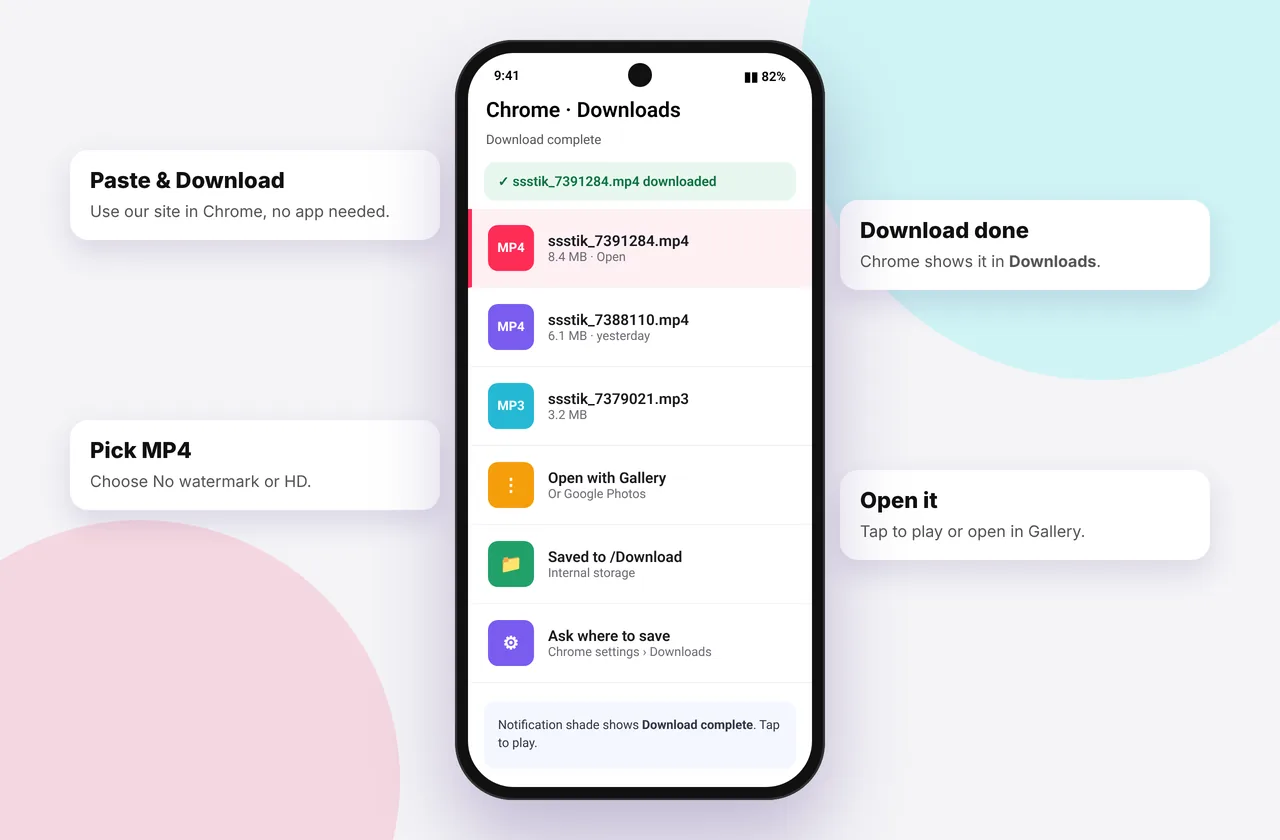
Android makes downloading easy: files go straight into your Download folder and show up in Gallery or Google Photos within seconds. No extra step is needed. This guide covers Chrome, Samsung Internet and the quirks of popular phone brands.
Android users can download TikTok videos straight from Chrome or Samsung Internet, with no app to install.
Step-by-step on Android
- Copy the link. In TikTok, tap Share → Copy link.
- Open Chrome (or Samsung Internet, Firefox or Edge) and go to ssstiktokdownloader.com.
- Tap Paste, then Download. If Chrome asks for clipboard permission, allow it.
- Choose a format: MP4 · No watermark, HD or MP3.
- Chrome shows "Downloading…" at the bottom, then "Open". Tap Open to play the video.
The video is now in Download and will appear in your gallery app. Some brands show downloads in a separate "Downloads" album.
Shortcut: in Chrome, tap ⋮ → Add to Home screen to open SSSTikTok like an app.
Where Android saves TikTok downloads
| Phone | Default location | Where to see it |
|---|---|---|
| --- | --- | --- |
| Samsung Galaxy | Internal storage / Download | Gallery → Albums → Download |
| Google Pixel | Download | Google Photos → Library → Download |
| Xiaomi / Redmi / POCO | Download | Gallery → Albums → Downloads |
| Oppo / Realme / OnePlus | Download | Photos → Albums → Downloads |
| Vivo | Download | Albums → Downloads |
Can't find it? Open the Files or My Files app and tap Downloads. See where TikTok downloads are saved for more help.
Saving MP3 and slideshow photos
The MP3 · Audio button saves the soundtrack to Download, where your music player can find it. The MP3 downloader puts the audio first. To set it as a ringtone, see our ringtone guide.
For slideshows, Download all saves every image. Chrome may ask to allow multiple downloads, so tap Allow. See the photo downloader.
Samsung Internet tips
Samsung Internet sometimes opens videos in its own player. Tap the download icon in the player, or long-press the MP4 button and choose Download link. Ad blockers built into Samsung Internet don't affect the download buttons.
Fixing Android download problems
- "Download pending" stuck: check your connection, turn Wi-Fi off and on, and clear space if your storage is nearly full.
- Nothing happens when tapping the button: long-press it and choose Download link, or try another browser.
- "Can't play video": the file may still be downloading, or it's HEVC on an older phone. Install the free VLC app.
- No sound: the music was probably muted by TikTok. See no sound after download.
- "Invalid link": copy it again from Share → Copy link. See TikTok link invalid.
Why not use a downloader app?
Many Android downloader apps outside the Play Store come as APK files from unknown sites, which is a real security risk. Ones in the Play Store often stop working when TikTok changes. A browser-based tool needs no permissions and is always up to date. Our app vs online comparison explains the trade-offs.
Using downloaded TikToks
Clean MP4s are great for editing your own content in CapCut or InShot, or for sharing to WhatsApp Status (which trims videos to 60 seconds). For the best quality, download the HD version and send it as a document in messaging apps so it isn't compressed.
Other devices
Using a computer? See the PC guide or the Mac guide. For iPhone, use the iPhone guide.
Saving to an SD card
Many Samsung, Xiaomi and Motorola phones support microSD. In Chrome, tap ⋮ → Settings → Downloads → Download location and choose SD card. If your version of Chrome doesn't offer that, download to internal storage and move the files later in your file manager: long-press a file, tap Move and pick a folder on the SD card.
Android Go and low-memory phones
Entry-level phones running Android Go may use Chrome or Google Go. Downloads still work, but use Wi-Fi for HD files and close other apps first. If a download keeps failing, choose the standard MP4 instead of HD. It's half the size and looks almost identical on a small screen.
Sharing to WhatsApp Status without losing quality
WhatsApp compresses videos and limits Status clips to 60 seconds. For the best result, download the HD version, trim it to under 60 seconds in your gallery's editor, then post it. To send a full-quality file to a contact, attach it as a Document instead of choosing it from the gallery.
Mistakes to avoid on Android
- Installing "TikTok downloader" APKs from random sites. They're a common malware route.
- Letting a "cleaner" app delete old files in Download automatically.
- Turning on Chrome's Lite mode or data saver on older versions, which can interfere with large files.
Every SSSTikTok tool
Safe, private and respectful
- No login, ever. We never ask for your TikTok password. Treat any site that does as a phishing risk.
- No installs. Everything runs in your browser. Ignore any advert that offers an app, extension or "codec".
- No history. Results are cached for about 15 minutes, then deleted. See the privacy policy.
- Public content only. We don't bypass private accounts or deleted posts.
- Credit creators. Saving for personal use is common, but reposting needs permission. Read is it legal to download TikTok videos?
Frequently asked questions
Where do TikTok downloads go on Android?
They go to the Download folder in internal storage, and appear in Gallery or Google Photos under Downloads.
Which browser works best on Android?
Chrome and Samsung Internet both work well. Firefox and Edge work too.
Do I need to install an app?
No. Everything works in the browser.
Why can't I see the video in my gallery?
Some gallery apps take a moment to scan new files. Open Files → Downloads or restart the gallery app.
Can I save to an SD card?
Yes. In Chrome settings → Downloads, choose the SD card as the download location if your phone supports it.
Is it safe?
Yes. Nothing is installed, and the site asks for no permissions apart from clipboard access when you tap Paste.