
Is It Legal to Download TikTok Videos?
A clear, non-lawyer explanation of what's generally fine, what isn't, and how to respect creators.
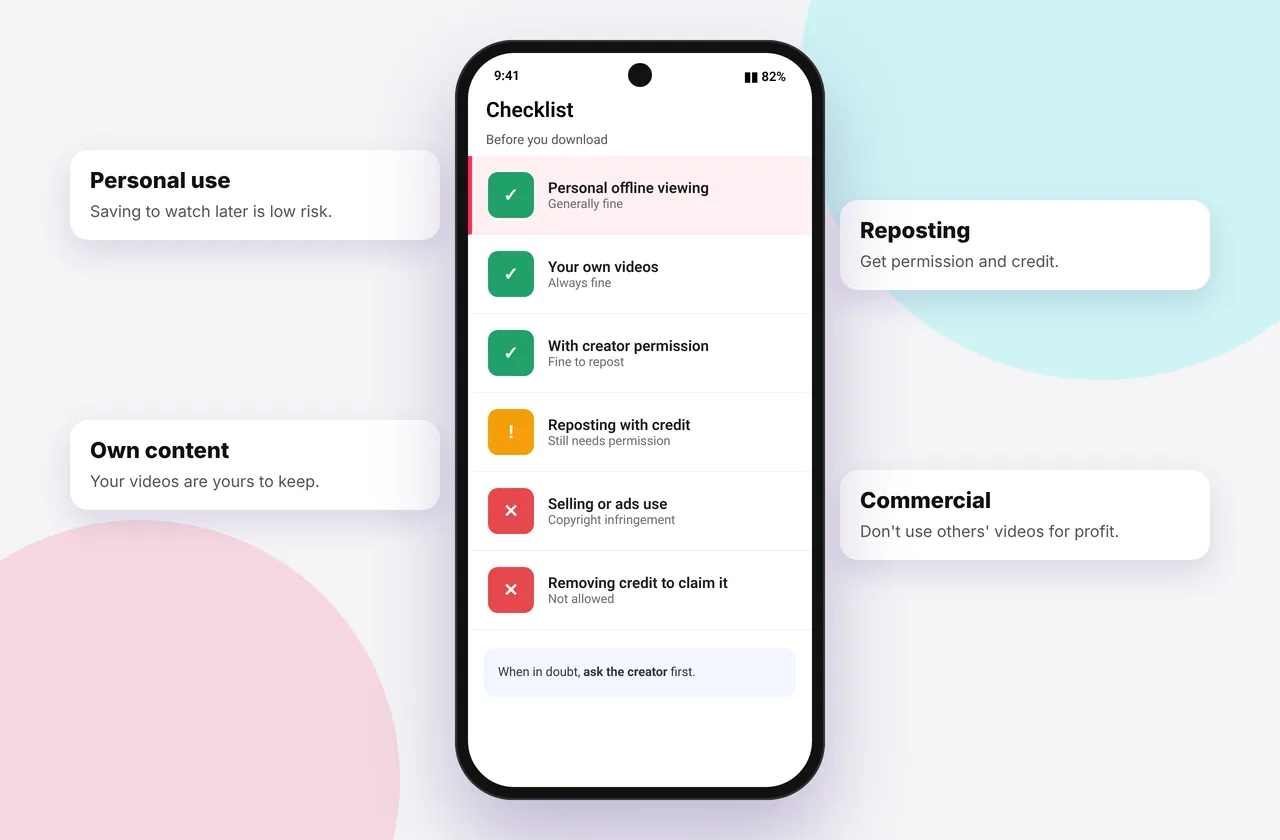
This page is general information, not legal advice. Copyright law varies by country. If you're planning commercial use, talk to a lawyer.
Using a TikTok video downloader is easy; using the file responsibly is what matters legally.
The short version
- Saving public videos to watch privately is very common and rarely pursued. It's widely treated as low-risk personal use.
- Re-uploading someone else's video, especially without credit, can infringe their copyright and breaks TikTok's rules.
- Commercial use of someone else's content, such as ads, products or monetised channels, requires permission.
- Music in videos is separately copyrighted by artists and labels.
Who owns a TikTok video?
The creator owns the copyright in their video. When they post, they give TikTok a licence to host and distribute it, but they still own it. Songs in the video belong to the artists and labels, licensed to TikTok for use within the platform.
What TikTok's terms say
TikTok's Terms of Service let you use the platform's features, including its own Save video button where enabled, and ask users not to copy or redistribute content outside those features without permission. Downloading through third-party tools isn't something TikTok formally endorses, so use downloads responsibly.
Generally fine
- Saving your own videos
- Watching saved public videos offline yourself
- Keeping a recipe, tutorial or reference for personal use
- Downloading when the creator gave permission or licensed the content openly
Risky or not okay
- Reposting someone's video as your own
- Removing credit or watermarks before sharing
- Using clips in ads, paid promotions or merchandise
- Compiling others' videos on a monetised channel without licences
- Distributing music extracted from videos
Fair use and fair dealing
Some countries allow limited use for commentary, criticism, education, news or parody (fair use in the US, fair dealing in the UK, Canada and elsewhere). It depends on the facts, such as how much you use, why, and whether it harms the creator's market. Don't rely on it without understanding it.
Being a good digital citizen
- Ask creators when you want to share their work.
- Credit them with their @username and a link.
- Use Duet or Stitch to react inside TikTok.
- Respect takedowns. We honour valid notices via our DMCA page.
Where SSSTikTok stands
We're an independent tool that fetches public media. We don't host videos, we don't bypass privacy settings, and we block content when rights holders ask. See our terms and disclaimer.
Related: how to remove the TikTok watermark and private TikTok videos.
Everyday scenarios
- Saving a recipe to cook later: personal use, which is common and low-risk.
- Putting a funny clip in your family group chat: usually tolerated, but crediting the creator is good manners.
- Posting someone's video on your own Instagram: needs their permission and credit.
- Using a creator's clip in a YouTube reaction video: might qualify as fair use if you add real commentary, but it depends on the facts.
- Using a TikTok in an advert for your shop: needs a licence from the creator, and from the music owner if there's music.
How to ask a creator for permission
Send a short, polite message: what you'd like to use, where it will appear, and how you'll credit them. Keep their reply as a record. Many creators say yes when asked, and some may ask for a fee for commercial use.
What happens if you get it wrong
Platforms like Instagram and YouTube respond to copyright claims by removing videos and issuing strikes. Repeat strikes can lead to account suspension. Commercial misuse can lead to legal claims for damages.
Quick device reference
| Device | Best browser | Where files go | Full guide |
|---|---|---|---|
| iPhone | Safari | Files → Downloads, then Share → Save Video | iPhone guide |
| iPad | Safari | Files → Downloads | iPad guide |
| Android | Chrome or Samsung Internet | Download folder and Gallery | Android guide |
| Windows | Chrome, Edge or Firefox | This PC → Downloads (Ctrl + J) | PC guide |
| Mac | Safari or Chrome | Finder → Downloads | Mac guide |
Lost a file? Our page on where TikTok downloads are saved covers every brand and browser.
Every SSSTikTok tool
Safe, private and respectful
- No login, ever. We never ask for your TikTok password. Treat any site that does as a phishing risk.
- No installs. Everything runs in your browser. Ignore any advert that offers an app, extension or "codec".
- No history. Results are cached for about 15 minutes, then deleted. See the privacy policy.
- Public content only. We don't bypass private accounts or deleted posts.
- Credit creators. Saving for personal use is common, but reposting needs permission. Read is it legal to download TikTok videos?
Frequently asked questions
Is it illegal to download TikTok videos?
Saving public videos for personal viewing is common and generally low-risk, but redistributing them without permission can infringe copyright.
Can I repost a TikTok I downloaded?
Only with the creator's permission and proper credit.
Can I use TikTok videos in my YouTube videos?
Only with permission, or if your use clearly qualifies as fair use or fair dealing.
Is downloading TikTok music legal?
Personal listening is common, but redistributing or monetising songs needs a licence.