
Every TikTok has a cover image, the still frame or custom cover shown on the creator's profile grid and in search results. Creators spend real effort choosing covers, and marketers and editors often need them for playlists, reports and thumbnails of their own content. When you paste a link above, the result card shows the video's cover, and you can save it at full size.
How to use it in 3 steps
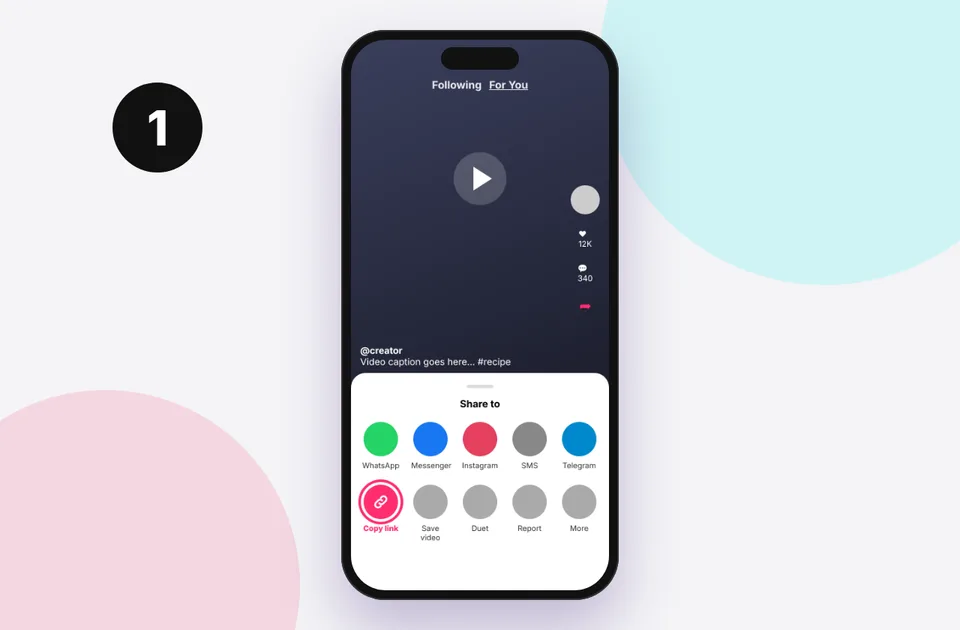
1. Copy the link
In TikTok tap Share → Copy link, or copy the address bar on a computer.
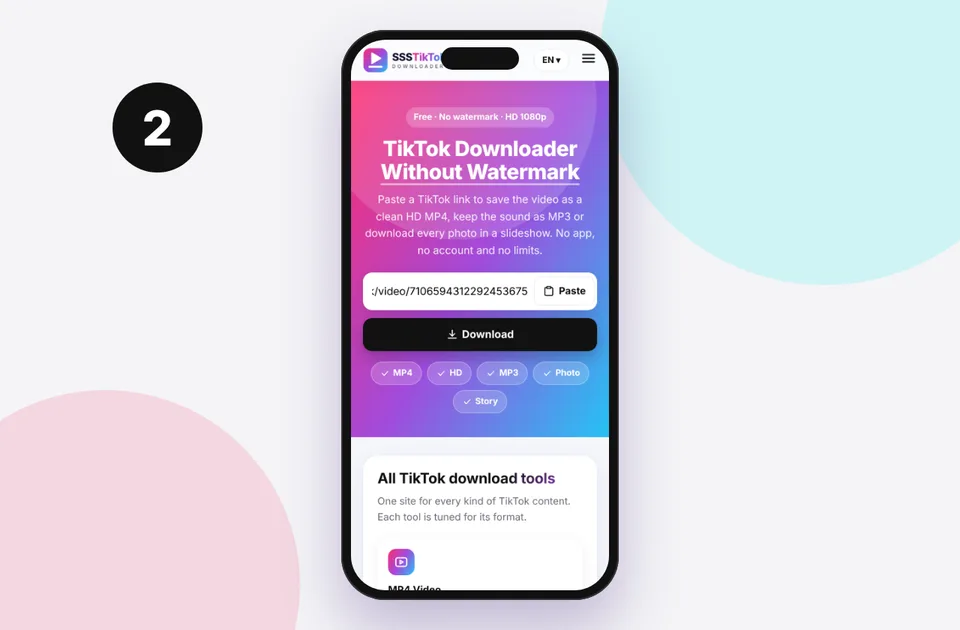
2. Paste and press Download
Paste into the box above. Short vm.tiktok.com and vt.tiktok.com links work too.
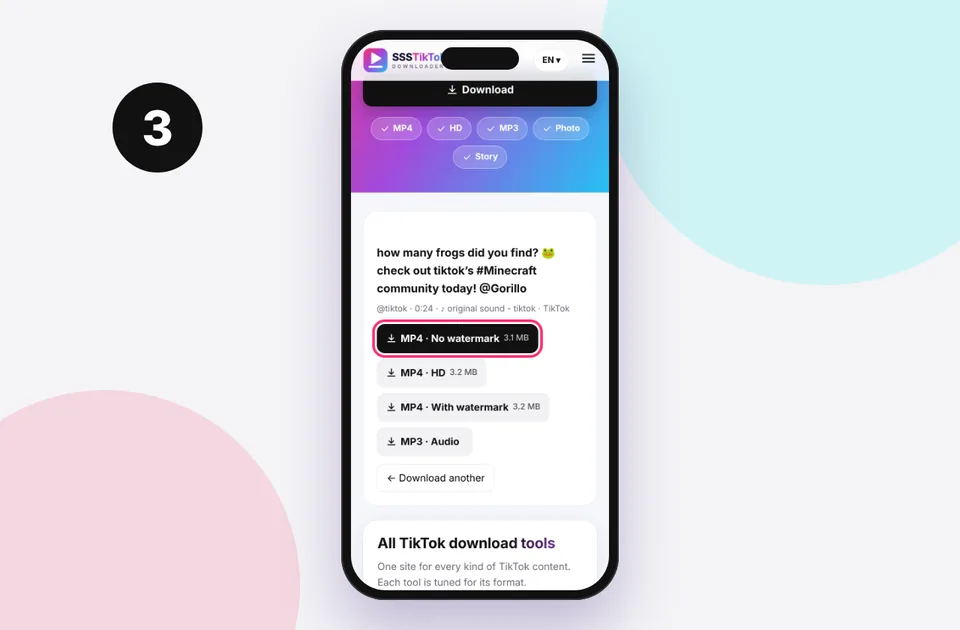
3. Choose and save
Pick the format you need and the file saves to your device's Downloads.
How to save a TikTok cover image
- Copy the video link (Share → Copy link).
- Paste it above and press Download.
- The cover appears on the left of the result card. Long-press it on a phone or right-click on a computer and choose Save image or Open image in new tab.
The cover is usually a JPEG or WebP image around 720×1280 pixels in the 9:16 vertical format. The video's own buttons (MP4, HD, MP3) appear next to it if you also want the clip.
On iPhone, long-press the cover and tap Add to Photos. On Android, long-press and choose Download image.
Why save a TikTok thumbnail?
- Creators keep a library of their own covers to stay visually consistent or to reuse a design on YouTube Shorts and Reels.
- Social media managers add covers to monthly performance reports.
- Editors and bloggers reference a video in an article. Embedding the video or linking to it is usually better, and if you use the cover, credit the creator.
- Archivists keep a visual index of saved videos.
Cover vs a screenshot
A screenshot captures your screen, including TikTok's buttons, captions and the status bar. The cover file is the clean original image. It's also often a custom frame designed by the creator, which you can't get by pausing the video.
Making your own TikTok covers
If you're a creator, you can choose a cover in TikTok's post screen by tapping Select cover, then pick a frame and add text. Tips that work:
- Use large, high-contrast text of 3 to 5 words that stays readable at grid size
- Keep the important parts in the centre, because the profile grid crops the edges
- Stay consistent with your colours and fonts so your profile looks organised
You can download the clean video with our MP4 downloader, pick a frame in an editor and export it as a still.
Copyright and covers
Covers are part of the creator's content. Using someone else's cover on your own channel or in an advert needs their permission. For personal reference it's fine. See is it legal to download TikTok videos? for the general rules.
Related tools and guides
- TikTok HD downloader to get the video in the best quality
- TikTok photo downloader for slideshow images
- TikTok profile picture guide for full-size avatars
- Where TikTok downloads are saved if you can't find the image
Step-by-step on each device
iPhone and iPad
- Paste the link and tap Download.
- Long-press the cover image in the result card.
- Tap Save to Photos, or Open in New Tab to see it full size first.
Android
- Paste the link and tap Download.
- Long-press the cover and choose Download image.
- It saves to the Download folder and appears in Gallery.
Windows, Mac and Chromebook
- Paste the link and click Download.
- Right-click the cover and choose Save image as….
- Pick a folder and give the file a clear name.
Is the cover a custom design or a frame from the video?
Creators can choose any frame as the cover and add text to it. If the cover shows text that never appears in the video, it's a custom cover. If you want a different frame, download the video with the MP4 downloader, pause it on the moment you want, and export a still. In QuickTime use Edit → Copy. In VLC use Video → Take Snapshot. In the Windows Photos app, use the screenshot tool.
Getting the best quality
- Covers are usually 720 pixels wide. That's sharp on phones, but it can look soft if you blow it up for print.
- For a sharper still, grab a frame from the HD video instead. A 1080p frame has more than twice the pixels.
- Save as PNG if you plan to edit and re-save it several times, to avoid extra compression.
Mistakes to avoid
- Taking a screenshot of the TikTok app, which includes buttons and captions, instead of saving the clean cover.
- Using another creator's cover as your own thumbnail. It's their design.
- Pasting a profile link. Covers belong to individual videos, so copy the video link.
Mini FAQ
Why does the cover look different from the profile grid? The profile grid crops covers to roughly 3:4. The file you save is the full 9:16 image.
Can I get covers for slideshows? Yes. Slideshows have a cover too, and the photo downloader also saves every image in full.
Supported TikTok links
Paste any of these. You can even paste a whole message, and the link is picked out automatically:
- Share links: vm.tiktok.com/… and vt.tiktok.com/…
- Video pages: tiktok.com/@creator/video/…
- Photo posts: tiktok.com/@creator/photo/…
- Mobile web: m.tiktok.com/v/…
Profiles, sound pages, hashtags and live streams aren't single posts, so they can't be downloaded. If you see an error, read TikTok link invalid or the full errors and fixes list.
Quick device reference
| Device | Best browser | Where files go | Full guide |
|---|---|---|---|
| iPhone | Safari | Files → Downloads, then Share → Save Video | iPhone guide |
| iPad | Safari | Files → Downloads | iPad guide |
| Android | Chrome or Samsung Internet | Download folder and Gallery | Android guide |
| Windows | Chrome, Edge or Firefox | This PC → Downloads (Ctrl + J) | PC guide |
| Mac | Safari or Chrome | Finder → Downloads | Mac guide |
Lost a file? Our page on where TikTok downloads are saved covers every brand and browser.
Safe, private and respectful
- No login, ever. We never ask for your TikTok password. Treat any site that does as a phishing risk.
- No installs. Everything runs in your browser. Ignore any advert that offers an app, extension or "codec".
- No history. Results are cached for about 15 minutes, then deleted. See the privacy policy.
- Public content only. We don't bypass private accounts or deleted posts.
- Credit creators. Saving for personal use is common, but reposting needs permission. Read is it legal to download TikTok videos?
Frequently asked questions
What size are TikTok cover images?
Usually about 720×1280 pixels in the vertical 9:16 format, as JPEG or WebP.
Can I get the cover without downloading the video?
Yes. Paste the link, then save only the cover image from the result card.
Is the cover image watermarked?
No. The cover is the clean original image.
Can I download the cover of a private video?
No. Only public videos are supported.
How do I change my own TikTok cover?
When posting, tap “Select cover”. For posted videos, TikTok only lets you change the cover on some app versions.